Event agenda app: every session, hall and speaker on one screen
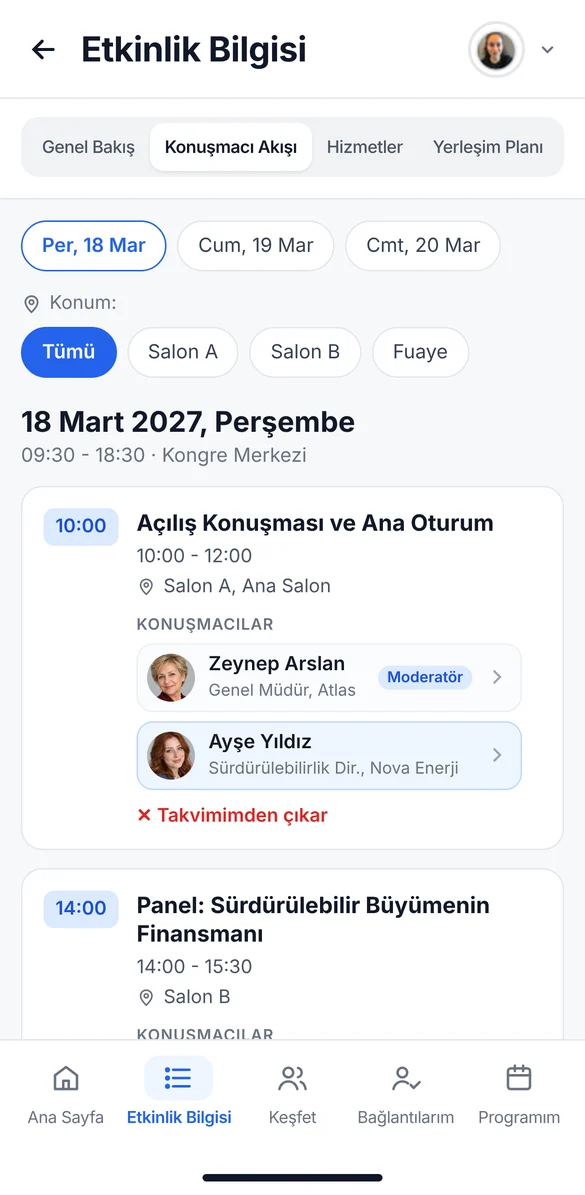
An event agenda app puts the whole program on every attendee's phone and keeps it current. In Speaker Flow, sessions are listed by day and hall with their speakers; attendees add the ones they will follow to their own calendar, and a change made in the panel shows up in the app right away.
Why it matters
A printed program is out of date the moment a session moves. Attendees look for the hall on one page and the speaker's bio on another, and a last-minute change reaches only the people standing at the notice board. At a congress or summit with parallel sessions, people miss the talks they came for.
How it works
Prepare the program in the panel
Enter days, halls, sessions and speakers in the organizer panel.
Sessions by day and hall
Attendees filter the program by date, hall and location. A speaker's photo, title and bio open with one tap.
A personal program
Attendees add the sessions they will follow to My Calendar, next to their meetings, and get a reminder before each one.
Changes reach the app at once
When a session's time or speaker changes, edit it in the panel; the update shows up in the app right away.
By event type
Congresses
Parallel scientific sessions listed by day and hall with speaker profiles; each delegate builds their own scientific program.
Conferences and summits
Keynotes, panels and side sessions in one program; attendees follow the speakers they came to hear.
Corporate events
At sales kickoffs, dealer meetings and internal summits, every employee sees the day's program and the hall for each session.
ReferenceAt TKBBV 2026, physicians built 300+ personal agendas from the congress program with Eventiqs, among 1,000+ participants.
Read the case studyFrequently asked questions
What is an event agenda app?
An event agenda app shows an event's program on attendees' phones: sessions by day and hall, who speaks when, and every change as soon as it is made. In Eventiqs, Speaker Flow holds the program and speaker profiles, and each attendee adds the sessions they will follow to their own calendar.
How do attendees build their own program?
They add the sessions they will follow to My Calendar, next to their meetings, and get a reminder before each session.
What happens when a session changes?
Make the change in the organizer panel; it shows up in the app right away.
What does a speaker profile show?
The speaker's photo, title and bio. The profile opens with one tap from every session the speaker is in.
How do attendees find the hall?
With Floor Plan active, halls and service points are marked on the venue plan in the same app.
See the modules on your own event.
Tell us your event's scale and format, and we will set up a walkthrough with the modules that fit.
Request a demo