Sponsor and exhibitor profiles: what a company page in an event app should show
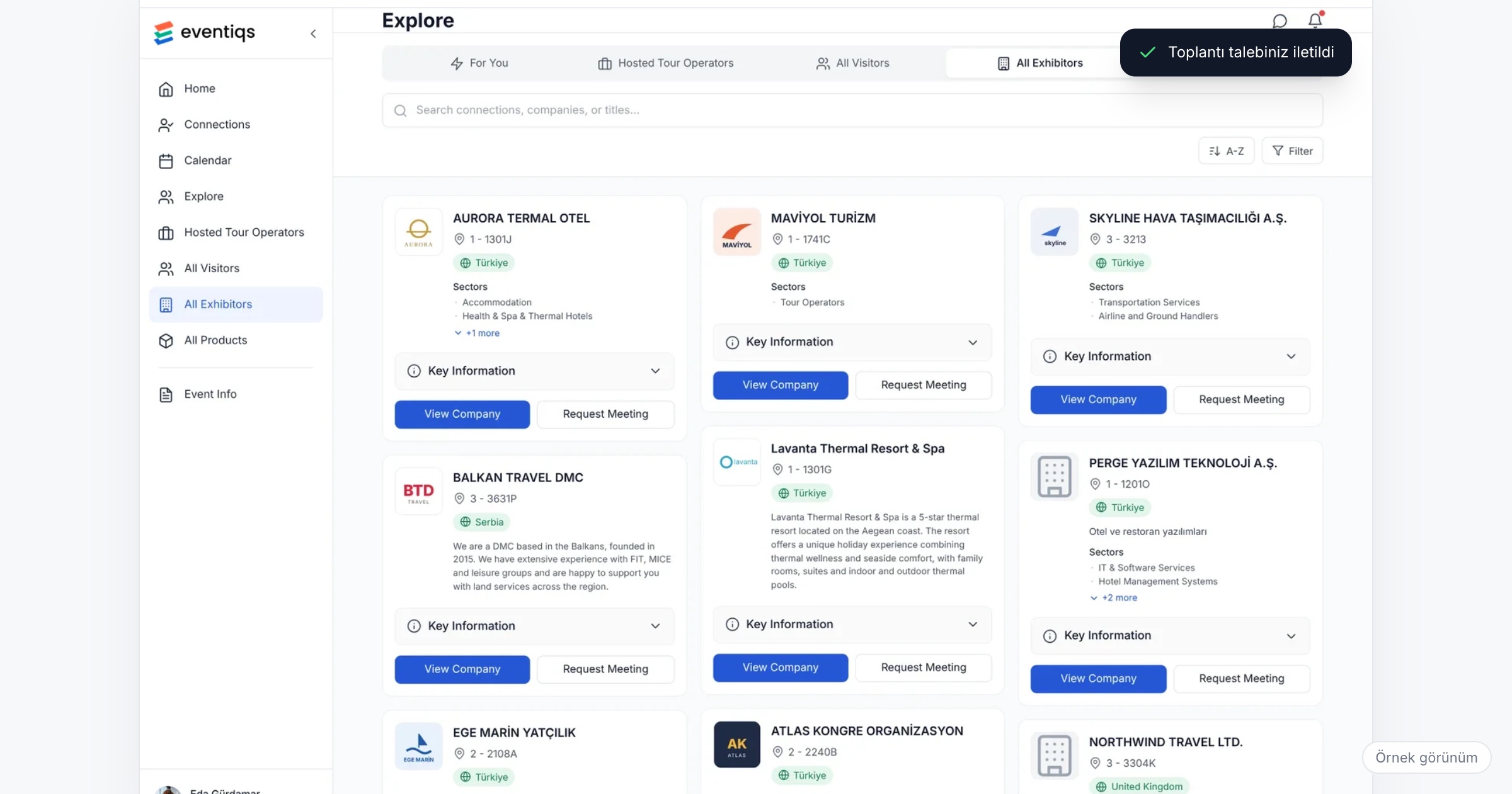
A sponsor or exhibitor profile is a company's page inside the event app: its logo and sponsorship tier, booth details, a short description, its products and catalogs, and the representatives attendees can connect with or ask for a meeting. It matters because attendees decide whom to visit on their phones, often before they reach the hall, and a page that shows only a logo gives them no reason to stop. When you choose an event app, check what a profile can hold, whether sponsors without a booth get a page too, where profiles appear on the home screen and in listings, and whether engagement is reported for each company.
Why company pages so often stay empty
Every company page depends on content that someone outside your team has to send. At a medical congress with a hundred sponsors, that means a hundred marketing teams, each with its own approval process. Two days before the opening, half have sent a logo, a few have sent a forty-page brochure, and nobody has said which product specialists will be at the booth. The pages go live with a logo and a line of text, and attendees learn to skip them.
At a company's own dealer meeting or customer summit, the problem looks different. The sponsors are often the host company's suppliers and partners: a logistics firm, a packaging supplier, a bank that offers dealer financing. They did not pay to see their logo on the backdrop. They paid to meet the dealers who matter to them, and their page is how those dealers find out who they are, what they offer and whom to talk to. An empty page wastes the one reason they came.
What a company page should show
1. Logo, tier and a description written for this audience
The logo and the sponsorship tier tell attendees who the company is and how closely it is tied to the event. The description should say what the company offers to the people in the room, not repeat the corporate website. A packaging supplier at a food manufacturer's dealer meeting should say what it does for dealers, in two or three sentences.
Ask the vendor: How is the sponsorship tier shown on the page and in the company list?
2. Booth details and the way to the booth
Hall and booth number belong on the page, and the attendee should be able to find the same company on the floor plan. At a congress where sponsor booths fill the foyer between session halls, this is the difference between a planned visit and a missed one during a fifteen-minute break.
Ask the vendor: When an attendee searches for a company on the floor plan, is its booth marked?
3. Products and catalogs
Attendees compare products before they walk over. Product pages with short descriptions, and catalogs they can open on the spot, let them arrive at the booth with a question rather than "what do you do?". One page per main product line usually works better than a single long brochure.
Ask the vendor: Can each product have its own page? Which file formats can catalogs be in?
4. Representatives attendees can reach
This is the part most pages leave out, and the part that turns a visit into a meeting. List the people who will be at the event with their names and titles, so attendees can send them a connection request, message them without sharing phone numbers, or request a meeting at a set time. Once a meeting is confirmed, it should appear in the attendee's calendar. For the supplier at a dealer meeting, this is how a regional sales manager gets meetings booked with the thirty dealers they came to see.
Ask the vendor: Can attendees request a meeting with a specific representative, and do confirmed meetings go into their calendar?
5. A page for sponsors without a booth
The gala dinner sponsor, the coffee break sponsor and the bank sponsoring the transfer buses often have no booth at all. They still need a page with their logo, description and representatives; otherwise their only visibility is a logo on a slide.
6. Being found
A good page helps only if attendees reach it. Sponsors can appear in a carousel on the home screen and in a Sponsors block, and sponsored company cards can sit at the top of the company list. Mark every paid placement with a Sponsored label, so attendees can tell a sponsored card from a search result; a label that is honest keeps the list trustworthy. Banner placements on the home screen and in listings add to this, and matchmaking that suggests companies as well as people sends attendees to pages they would not have searched for. We cover how to package and price these placements in growing sponsorship revenue with digital placements.
Ask the vendor: Which placements come with which sponsorship tier? Is the Sponsored label shown on every paid placement?
7. Results for each company
After the event, every sponsor and exhibitor will ask what its page produced. Engagement reported per company gives you the answer and the basis for the renewal conversation. Our sponsor report guide explains how to put it in a report.
Ask the vendor: What does the per-company report include, and when is it available after the event?
Checklist before the event
Collecting profile content is a small project of its own. Start it when the sponsorship contracts are signed, not when the app goes live.
- Send every company one content form with a deadline at least three weeks before the event, and one reminder a week before that deadline.
- Ask each company to name one person responsible for its page, so you are not chasing three departments.
- Decide who enters the content into the platform: the companies themselves or your team.
- Ask for the logo as a square version and a wide version, in high resolution (a vector file where possible), and get the exact image sizes from your platform before you send the form.
- Set a length for descriptions (two or three sentences) and for product texts, and ask for catalogs in a format phones can open.
- Collect the names, titles and emails of the representatives who will attend, and confirm they agree to appear on the page.
- Check every page on a phone before the app is announced, and send each company a screenshot of its page.
- Give companies without a booth the same form; their page matters more, because it is their main visibility.
Common mistakes
- Publishing pages with a logo only. Attendees learn quickly that company pages are empty and stop opening them.
- Leaving out the representatives. Without names to contact, a page can be read but not acted on.
- Pasting the corporate website text. A description written for every audience says nothing to the people at this event.
- Collecting content in the last week. Late content arrives in the wrong sizes and formats, and nobody has time to fix it.
- Hiding the Sponsored label. Attendees who cannot tell paid placements from listings stop trusting the list.
How Eventiqs helps
In Eventiqs, Sponsor and Exhibitor Profiles give every company a page with its logo, sponsorship tier, booth details and description, product pages with descriptions and catalogs, and the representatives attendees can connect with and request meetings from (sponsor and exhibitor profiles); a sponsor without a booth also gets a page. Sponsors appear in a home screen carousel and a Sponsors block, and with Advertising and Visibility, sponsored company cards sit at the top of the company list with a Sponsored label, next to banner placements on the home and Explore lists and sponsored push notifications. Engagement results are reported for each sponsor and exhibitor. At TKBBV 2026, about 100 sponsor companies took part in a congress with more than 1,000 visitors. For the booth side, see lead capture at trade shows.