QR code networking at events: saving a new contact with one scan
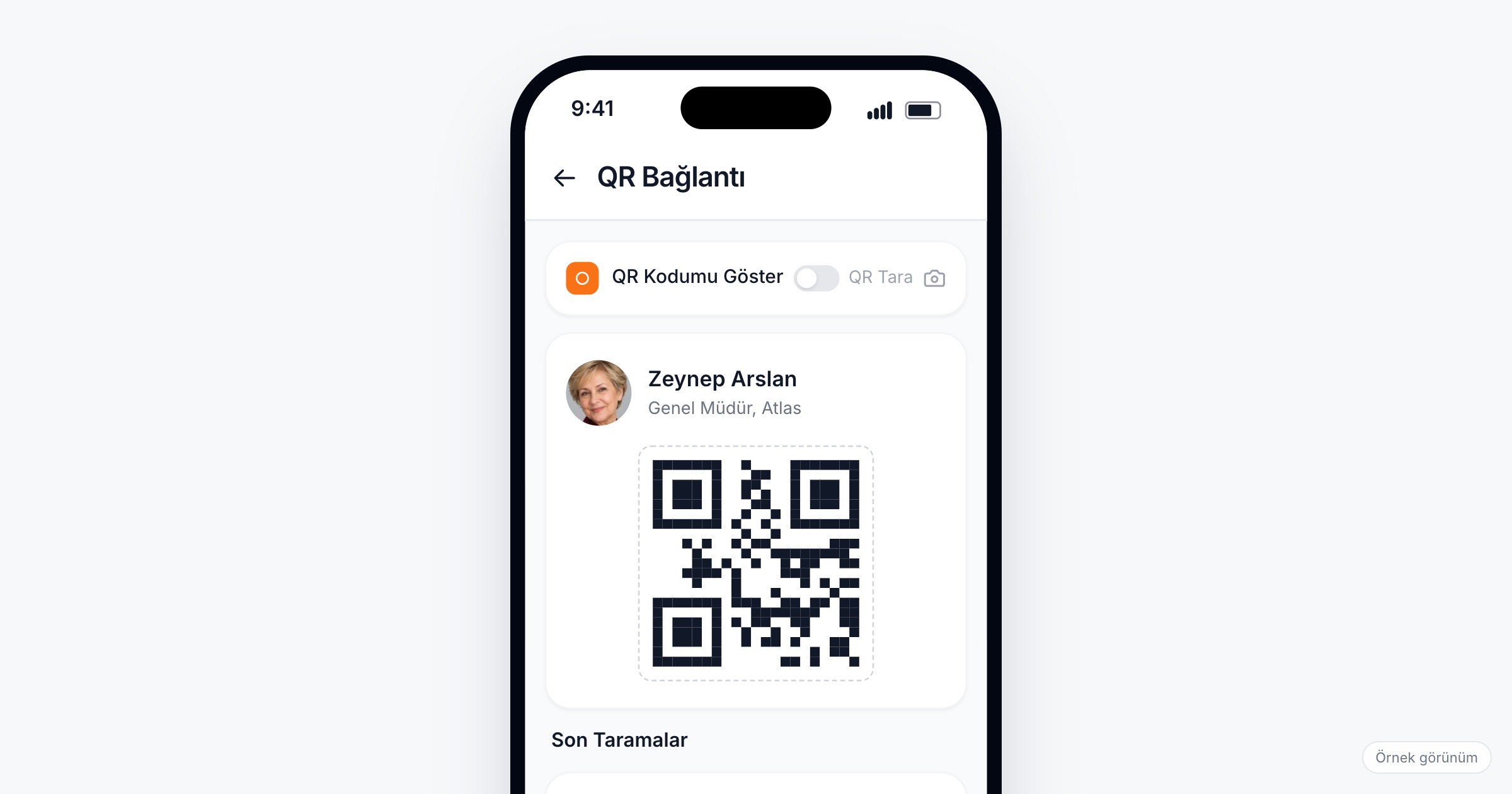
QR code networking means every attendee carries a personal QR code in the event app, and one scan by another attendee saves them as a connection, with a private note written on the spot. It replaces the business card swap and the phone number typed in a hurry, in a corridor, at a coffee break or across a dinner table, and works the same for a dealer, a new hire or a guest from abroad. When you choose a tool for it, check that the code lives in the app people already use for the program, that a note can be added right after the scan and stays private, that recent scans are easy to find again, and that connections can be exported once the event is over.
Why saving a new contact is harder than it looks
Picture the coffee break at a partner summit. Two people from different companies talk for six minutes about a shared customer, then the hall doors open. She left her cards at the hotel, so they swap phone numbers; he types her surname wrong, and a week later his phone holds "Elif partner summit" with no record of what they agreed.
Or the second night of a dealer meeting. A dealer from Antalya and one from Trabzon share a dinner table and find they have the same problem with the same logistics firm. At eleven at night nobody writes anything down, and on Monday neither remembers the other's company name.
At a kick-off, forty new hires meet a dozen colleagues each in two days, with no business cards yet; a week later they remember faces, not names. At an international event, add names in a script you cannot spell and cards printed in another language. And an employee talking to an outside supplier may not want to hand over a personal mobile number. Even a card that survives the trip home says who someone is, not what you talked about.
This is not the booth at a trade fair, where the exhibitor scans the visitor as a lead (trade show lead capture covers that). Between attendees, both sides are peers, either one may scan, and the goal is to stay in touch.
When QR works better than cards or phone numbers
- In corridors and queues, with no table to write on and a minute before the next session.
- At coffee breaks and dinners, where conversations end without warning.
- With mixed audiences (employees, dealers, suppliers, partners), where nobody wants to give a personal number to someone they met ten minutes ago.
- With international guests, where a scanned profile avoids misspelled names.
- With people who have no cards: new hires, guests, speakers who travel light.
Cards still help with someone who does not use the event app. QR only needs to be the easier choice when both people have the app open.
What to look for in QR networking
1. A personal code in the app people already use
The QR code should sit in the event app attendees already open for the program and their calendar, not in a separate tool downloaded on the day.
Ask the vendor: Where does an attendee find their own code? Do they scan with the event app itself, or with a separate scanner?
2. One scan saves the profile
After the scan, the other person should appear as a connection with their name, organization and title already filled in from what they gave at registration. Nothing is typed, so nothing is misspelled.
3. A note right after the scan, visible only to the writer
The note makes a connection useful a week later: "same issue with the logistics firm, call after the 15th" or "wants the onboarding deck from HR". It has to be quick to write while the other person is still there, and private, so people write what they actually think.
4. A warning when you are already connected
At a two-day event you meet the same people twice. The app should tell you that you are already connected, so you add to your note instead of starting over.
5. Recent scans you can find again
"The person I met at lunch" is how most people remember a contact. A list of recent scans lets them find that person by when they met, not only by a name they half remember.
6. A bulk export after the event
After the event, people want their connections where they work, in a spreadsheet or their own contact list, without copying them one by one.
Ask the vendor: Can attendees export their connections in bulk? In what format?
7. The same app as messaging and meetings
A corridor connection often turns into "let's sit down tomorrow". When it sits next to messaging and meeting requests in the same app, that next step needs no phone number either.
8. A count the organizer can see
Organizers should see how many scans happen while the event runs. A low number by lunch on day one is a signal to remind people.
Ask the vendor: Can we follow QR scans live during the event?
Etiquette and privacy
Showing your code is the invitation, and scanning is the acceptance; ask before you scan ("shall I scan you?"), and do not scan a code someone has not offered. Write notes you would not mind the other person reading, even though they cannot. And treat a scan as permission to stay in touch about that conversation, not to add someone to a mailing list.
On the organizer side, a scan shares profile data between attendees. For this data the organizer is usually the data controller, and the app vendor the data processor. Under Turkey's KVKK and the GDPR, the privacy notice should say what a scan shares and with whom, and you should collect only the profile fields people actually need to see. An exported file of connections is personal data too; ask attendees to store it with care. This article is not legal advice; talk to your legal counsel about your own case.
Checklist before the event
- Decide which profile fields a scan should show, and collect them at registration.
- Tell attendees where their QR code is in the welcome email and the welcome push notification.
- Add one line to the badge or the table cards: "Scan each other's QR code in the event app."
- Ask the host to mention it in one sentence at the opening session.
- Ask your own team (hosts, headquarters staff, speakers) to scan the first few people, so others see how it works.
- Schedule a push for the last afternoon reminding people to add notes to the day's scans and export their connections.
- Check the scan count on the first day and send a reminder if it is low.
Common mistakes
- Mentioning QR only in an app tour. A sentence from the stage and a line on the badge reach more people.
- Scanning without a note. A week later the connection is a name with no reason to call.
- Confusing the download QR with the personal one. If signs carry a code that opens the app store, label it clearly so people do not try to connect with a poster.
- Treating exported connections as a marketing list. People agreed to stay in touch about a conversation, not to receive every newsletter.
- Leaving it for people to discover. QR networking spreads when the first few scans happen in front of others.
How Eventiqs helps
On Eventiqs, every attendee has a personal QR code in the event app, and scanning it with the app saves the person as a connection (QR connections). A private note can be added right after the scan, visible only to the person who wrote it; the app warns if you are already connected, recent scans are listed, and connections can be exported in bulk to Excel. QR Connections runs in the same app as the program, the directory and messaging. Organizers follow QR scans among the live indicators in the panel and send the welcome push and reminders by category or by person. For contacts captured at a booth, read our post on trade show lead capture; for the wider picture, see networking at corporate events.