Personal agendas at events: one calendar per attendee, and reminders that fill the sessions
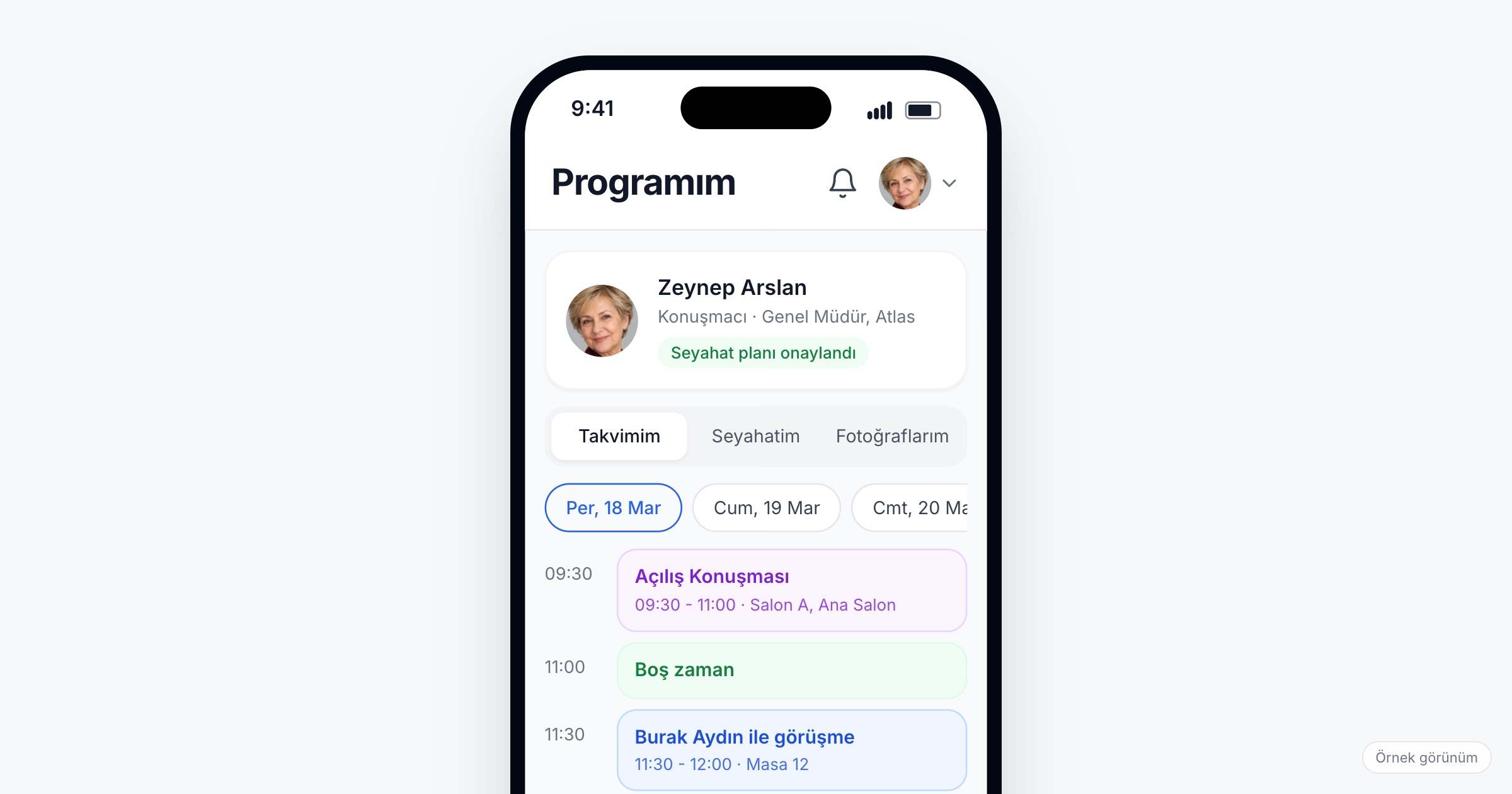
A personal event agenda is an attendee's own day at an event: the sessions they chose, the meetings they agreed to and any speed networking rounds, in one calendar on their phone, with a reminder before each session. It matters because without it attendees rebuild their day from a printed program, email confirmations and chat messages, and that is where sessions get missed and meetings get double-booked. When you choose an event schedule app, check that sessions and meetings land in the same calendar, that a reminder arrives before each session, that attendees can see their free time before they accept a meeting, and that the home screen tells them what is next.
Why every attendee's day is different
Two people with the same badge can have nothing in common by lunchtime. Corporate events make the gap sharper. Take a 400-person dealer meeting that opens with a product launch. A sales rep spends the morning in the plenary, then meets six dealers from her region back to back in the afternoon. A dealer from Konya attends the product training, has two meetings with his contacts at the company and joins a speed networking round with other dealers. A regional manager skips the training for a closed review meeting and is expected at a dinner with key accounts in the evening. Same venue, same day, three different schedules.
Each of them usually pieces that schedule together from three sources: the printed program in the welcome pack, meeting confirmations scattered across email, and messages in a group chat ("can we move to 15:30?"). The result is familiar. A dealer misses the training because he waited outside the wrong hall. Two people book the same sales rep for 14:00. A meeting moved in the chat never makes it into someone's notes, and one person sits at a table alone.
Congresses and trade fairs have the same pattern on a larger scale: hundreds of sessions, meetings with exhibitors or colleagues, and a day that has to be planned between halls.
What to look for in a personal agenda
1. Sessions and meetings in one calendar
The test is simple: can an attendee see everything they need to be at today, in time order, on one screen? Sessions chosen from the program and confirmed meetings should sit in the same flow, not in separate tabs the attendee has to compare.
Ask the vendor: When a meeting is confirmed, does it appear in both people's calendars with its time and place?
2. Choosing sessions from the program
The personal agenda starts from the shared program. Adding a session should be possible from the session itself, and the program should filter well enough that people find sessions worth adding. We cover the program side in event agenda apps.
3. A reminder before each session
People mean to attend the 11:00 workshop; then a conversation in the foyer runs long. A reminder notification before each session they chose helps them make it to the right hall on time. An event app with reminders only helps if the reminders stand out, so keep the total number of notifications in check and do not bury session reminders among general announcements.
Ask the vendor: Is a reminder sent for every session in the personal agenda without the attendee setting it up? What exactly does the attendee receive?
4. Free time visible before a meeting is booked
Double bookings happen when the person proposing a time cannot see their own open slots next to the request. A view of free time lets an attendee pick a slot that is actually open, and lets the other side accept without checking three apps first. This matters most at dealer meetings and launches, where a few people (sales reps, product managers, executives) are in demand all day.
5. Speed networking rounds in the same calendar
If the event runs speed networking, each participant's table, time and partner should appear in their calendar once the organizer publishes the round plan. A participant who has to find their table on a printed sheet at the door loses the first minutes of the round. Our speed networking guide covers how to set one up.
6. A home screen that shows what is next
Most attendees open the app between two things. The first screen should answer "where do I need to be next?" by showing the next session or meeting, not a feed they have to scroll.
7. Reminders from the organizer, planned in advance
Beyond session reminders, some messages are worth scheduling before the event: "build your agenda" a week before, "tomorrow's program is in the app" the evening before. Setting these up in advance, by attendee category, keeps your team from writing messages at midnight during the event.
Ask the vendor: Can we schedule email and push reminders in advance by category? Do we see delivery and click rates for each send?
Checklist before the event
- Publish the full program early enough for attendees to build their agenda before they arrive.
- Tell attendees in the invitation email that their personal calendar is in the app, and what will appear in it.
- Open meeting requests before the event, so meetings are confirmed rather than improvised on the day.
- Ask the people everyone wants to meet (sales reps, product managers, speakers) to answer meeting requests quickly, so their free time stays accurate.
- Publish speed networking rounds before the event day, so tables and times are already in calendars.
- Schedule reminder emails and push notifications for the week before and the evening before.
- Brief the help desk: when someone asks "where am I supposed to be?", the answer is on the app's home screen.
Common mistakes
- Sending meeting confirmations only by email. They sit in an inbox the attendee does not open at the venue, far from the sessions they clash with.
- Arranging meetings in group chats. A time changed in a chat never reaches the calendar, and two people end up waiting at different tables.
- Leaving the program for the event day. Attendees who see the program for the first time at breakfast do not build an agenda; they follow the crowd.
- Sending too many notifications. If every announcement is a push, session reminders get ignored along with the rest.
- Forgetting the busiest people. The few people everyone wants to meet are the ones who get double-booked; make sure they see their own day clearly first.
How Eventiqs helps
On Eventiqs, each attendee's day lives in My Calendar (personal calendar). Sessions chosen from the program and meetings sit in one flow, with a reminder notification before each session, and the free-time view shows open slots for meetings. Meetings confirmed through meeting requests or Smart Matching land in both people's calendars with time and place, and published speed networking meetings appear with each participant's table, time and partner. The home screen shows the next meeting or session. Your team can schedule reminder flows by email and push in advance, by category or by person, and sees delivery and click rates for every send. At TKBBV 2026, an event with 1,000+ visitors, 300 personal calendars were created with Eventiqs. For the full picture at company events, read corporate event apps.