Measuring corporate event success: the numbers to bring to management
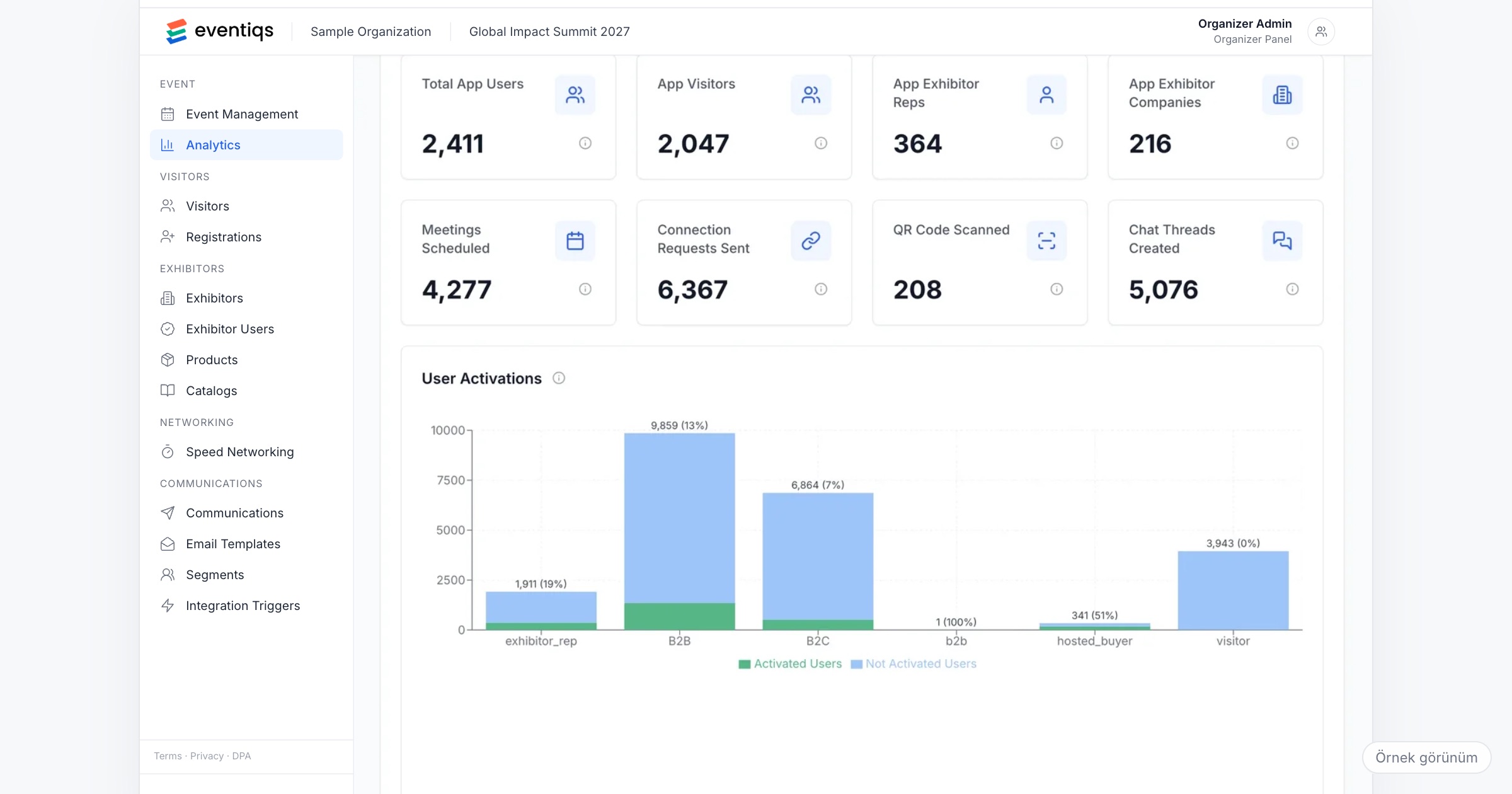
Measuring corporate event success means comparing what the event was meant to change, such as alignment in the sales team, relations with dealers or a pipeline with partners, with evidence collected before, during and after it. The event app supplies part of that evidence: registrations by category, active users, meetings held, QR scans, messages, and the delivery and click rates of every announcement. The rest, such as whether people understood the new strategy or whether dealers ordered more, comes from a survey and from your own sales data. When you choose an event app, check which of these numbers it reports live and per group, and plan the survey and the sales comparison yourself.
Why measuring a corporate event is different
A trade fair proves itself with ticket sales and exhibitor renewals. A corporate event has an invited audience who attend because the company asked them to, so a full hall at a sales kick-off proves little.
The question also arrives late and from someone who was not in the room. Two weeks after a dealer meeting in Antalya, the finance team is looking at the invoice for flights, hotel rooms and the gala dinner for 250 dealers, and the general manager asks a simple question: was it worth it? The honest answer shows up months later, in sales figures, renewals and staff turnover, data the event team does not own.
What the event team can do is decide in advance what the event should change, collect the evidence the app produces, and say which parts of the answer must come from elsewhere.
What to measure, and where each number comes from
1. Decide the goal before the invitations go out
"Was it worth it?" can only be answered against a goal. Agree on one or two with the internal owner of the event, and write down the evidence that would show each:
- Alignment (a kick-off or a strategy meeting): employees heard the message and, in a survey afterwards, can say what changes for them.
- Dealer relations (a dealer meeting or an incentive trip): dealers met the people they needed to meet, and renewals or orders in the following quarter can be compared with the year before.
- Partner pipeline (a customer summit or a launch): planned meetings took place and partners asked for a follow-up.
A goal written after the event tends to fit whatever numbers happen to be available.
2. Registrations and the split by category
Start with who came. Invited, registered and active in the app are three different numbers, and each category (employee, dealer, partner, speaker, guest) tells its own story. Dealers from one region registering late is a finding before the event begins.
Ask the vendor: Can we see registrations by category in the panel while registration is still open?
3. Active users and messages
The share of registered people who actually used the app shows whether the event reached them beyond the main stage. Messages show whether people talked to each other or only listened: a sales team that messages product managers during the breaks is a different result from one that does not.
Ask the vendor: How is an active user defined? Can we see the numbers per day of the event?
4. Meetings, connection requests and QR scans
At dealer meetings and partner summits, meetings are the closest thing to an outcome the app records. Planned meetings and connection requests show intent; QR scans show people meeting face to face. Follow them live, so a dealer group with no meetings after day one still gets an introduction on day two.
Ask the vendor: Can we follow planned meetings and connection requests live, not only in a report afterwards?
5. Speed networking feedback
When dealers meet the head office team, or partners meet the sales team, in speed networking rounds, each participant says afterwards whether the meeting happened, rates it and marks whether they want to follow up. That last answer names the conversations worth continuing, which is what a sales director wants to see.
6. Delivery and clicks for every announcement
Invitations, the activation email, reminders and push notifications about a changed transfer time all leave a trace: delivery and click rates per send show which messages reached people. If the agenda email for the kick-off had a low click rate, the team may have arrived without reading it.
Ask the vendor: Are delivery and click rates reported for every send, email and push alike?
7. What the app cannot show
Be clear with management about the limits: an app records what people did in it, not what they understood or felt. Satisfaction, understanding of the strategy and ideas for next year need a post-event survey in your own survey tool. Sales results, renewals and pipeline value come from your CRM or the sales team, and cost per person from finance. An app also knows who added a session to their calendar, not who sat in the room, unless the session has its own check-in.
Reading the numbers: rates before counts
A count without a base says little. "320 active users" sounds good until someone asks how many were invited. Turn counts into rates against a base that management recognises: active users against registered people, registrations against invitations, meetings that happened against meetings planned, clicks against delivered messages.
Compare like with like: last year's dealer meeting, not a trade fair with 20,000 visitors. And look at the split; a healthy total can hide one category that did not take part, which is usually where the next event should improve.
The one-page report for management
Management reads one page. Put on it:
- The goal agreed before the event, in one sentence.
- Attendance: invited, registered and active, by category.
- Three to five numbers from the app that relate to the goal, each as a rate with its base.
- The two or three findings from your survey.
- What sales or HR data will show, and when you will report it (for example, after the next quarter closes).
- One recommendation for the next edition.
Keep the detail in an appendix; a report that admits a weak result in one category is more credible than one where every number is good. If sponsors supported the event, they need their own report; our sponsor report guide covers that.
Checklist before the event
- Write down the goal and the evidence that would show it, and agree it with the internal owner of the event.
- Define the attendee categories, so every number can be split by them.
- Decide which numbers you will follow live and who on the team watches them.
- Prepare the post-event survey in your own tool and plan when it goes out.
- Ask the sales or HR team which figures they can share after the event, and when.
- Plan the activation email and reminders, so their delivery and clicks can be compared.
- Agree the date the one-page report goes to management.
Common mistakes
- Reporting counts without a base. A number of users or messages means little without the number of people invited.
- Choosing the goal after the event. The report then describes what happened, not whether the event did its job.
- Treating app numbers as the whole answer. Usage shows participation, not understanding or sales results.
- Waiting a month to report. By then the budget discussion for the next event has started without you.
- Hiding a weak category. A region or team that did not take part is the most useful finding for next year.
How Eventiqs helps
On Eventiqs, the numbers in this article come from modules that share one app and one organizer panel. Registration and Visitor Management tracks registrations and their split by category (event registration). Analytics and Reporting shows live indicators (active users, meetings, QR scans and messages), follows planned meetings and connection requests while the event runs, and reports visitor, sponsor and exhibitor performance separately (analytics); accumulated data then feeds the planning of the next edition. Communication reports delivery and click rates for every email and push send (communication), and after each speed networking meeting participants say whether it happened, rate it from 1 to 5 and mark whether they want to follow up. The survey and the sales comparison stay with your team. See also corporate event apps and networking at corporate events.