Event support desks: answering attendee and exhibitor questions before they pile up
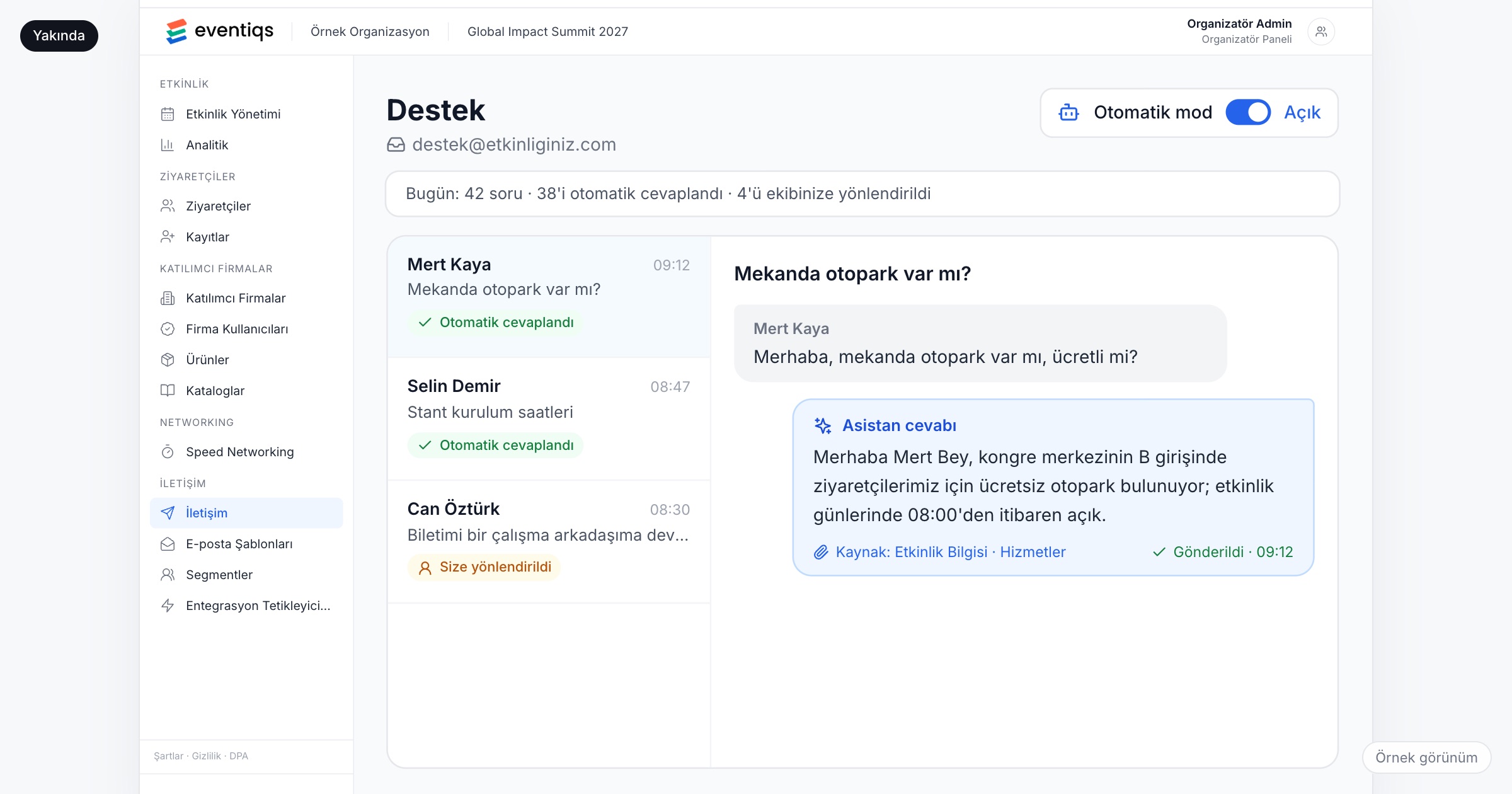
An event support desk is the team, the shared inbox and the set of answers that handle attendee and exhibitor questions before and during an event: where to park, when a session starts, when booths can be set up, where to collect a badge, how to join the Wi-Fi, when the transfer leaves. It matters because most of these questions repeat, and every hour your team spends answering the same one is an hour taken from the problems only people can solve. Whatever tools you use, check that answers come from one maintained FAQ built from the program and venue details, that sensitive questions go to a person, that a handover carries the full thread, and that you measure what the desk handles.
Why event support gets hard
Take a 500-person dealer meeting in a resort hotel. The invitation went out three weeks ago with the program as a PDF attachment. The week before the event, the shared inbox fills up: "Is there parking at the hotel?", "What time does the first session start?", "Can I bring my spouse to the gala?", "Which airport should I fly to?". Most of the answers are in the attachment. People write anyway, because writing is faster than searching a PDF on a phone, and the same five questions arrive forty times each.
An incentive trip is worse, because every question is about logistics: luggage limits, the dress code for the gala dinner, what time the bus leaves for the excursion, whether the hotel has a gym. At a trade fair, the questions come from exhibitors as well: move-in hours, power connections at the booth, where freight is delivered, how many exhibitor passes come with a stand. Exhibitors ask early and in detail, and a wrong answer costs them money.
Three things make it worse. Questions land in several team members' personal inboxes as well as the shared one, so nobody knows what has been answered. The program changes on Wednesday, and the answer someone sent on Monday is now wrong. And among the parking questions sits a refund request, a complaint about a hotel room or a guest's dietary need, which waits two days because it looked like everything else.
How to run an event support desk
1. Build the FAQ from the program and venue details
Most answers already exist somewhere: in the program, the venue's information pack, the exhibitor manual and the travel plan. Turn them into an FAQ before the invitations go out. Cover parking and entrances, session times and halls, badge collection, Wi-Fi, transfers and shuttles, the dress code, and, for exhibitors, move-in and move-out times, power, deliveries and passes. Write each answer as a complete sentence with the time, the place and the exception ("Parking is free in the hotel's underground car park; the entrance is on the side street").
Ask the vendor: What sources can the support tool answer from: the program, venue details, our own FAQ? How do we update them when the program changes?
2. Decide which questions only your team answers
Some questions should reach a person every time: refunds, ticket transfers, complaints, accessibility and dietary needs, anything about a specific person's booking or personal data, and anything about safety. Write this list down and share it with everyone on the desk. The rest (where, when, how) is routine, and routine questions are the ones worth answering from the FAQ.
Ask the vendor: Can we set topics that go straight to our team, whatever the question looks like?
3. One shared inbox, one owner per shift
Ask the team to forward anything that reaches their personal inbox to the shared one, and name who owns the inbox in each shift. During the event days, decide the hours the desk is staffed and say them in the invitation. A question that arrives at 23:00 the night before the event is usually urgent, so someone should be on duty.
4. Hand over with the full thread
When a question moves from the first responder to a colleague, or from a tool to a person, the person taking over should see the whole conversation: the question, what was already said, and what the attendee or exhibitor attached. Nobody should have to write "can you repeat your question?".
Ask the vendor: When a question is handed to our team, do we see the full thread?
5. Do not guess
"I will check and come back to you" is a better answer than the wrong parking entrance. Anyone on the desk, and any tool you use, should hand a question over when the answer is not in the event's information, instead of improvising. Wrong answers spread: the attendee forwards them to colleagues, and the desk then answers a second round of questions about the mistake.
Ask the vendor: What does the tool do when the answer is not in our event data?
6. Learn from every reply
Each time the team answers a new question, add the answer to the FAQ the same day. In the last week before the event, review the new questions every evening. When the program or a venue detail changes, update the FAQ first and then tell the affected people, so the next answer is already correct.
7. Measure the desk
Count questions by topic and by day, and note how many were answered from the FAQ and how many needed the team. Look at the time to a first reply on busy days. Repeated questions point to a gap: the invitation email did not say it, or the app does not show it where people look. Carry those gaps into the planning of the next edition.
Checklist before the event
- Collect the program, the venue information pack, the exhibitor manual and the travel details in one place.
- Write the FAQ, with separate sections for attendees and exhibitors.
- Write down the topics only your team answers, and who handles each of them.
- Set up one shared inbox, and agree that personal inboxes forward to it.
- Draw up the desk's shift plan for the final week and the event days.
- Put the most-asked answers (parking, first session, badge collection, Wi-Fi) in the invitation and in the app.
- Agree how the FAQ is updated when the program changes, and who does it.
Common mistakes
- Treating the PDF attachment as the answer. People do not search a PDF on their phones; they write to you instead.
- Letting questions sit in personal inboxes. Nobody knows what has been answered, and some questions get two different answers.
- Answering sensitive questions from a template. A refund request or a complaint answered like a parking question turns a problem into a bigger one.
- Updating the program but not the FAQ. The desk keeps sending Monday's answer after Wednesday's change.
- Not counting the questions. Without numbers by topic, you cannot fix the invitation or the app content for next time.
How Eventiqs helps
Some questions can be answered before they are asked, by putting the information where attendees already look. In Eventiqs, the program is shown by day and hall, and changes made in the Organizer Panel appear in the app right away (program and speakers); venue maps, services and useful links are managed in the panel (organizer panel); and segmented email and push by category or by person let you tell the affected people about a change (email and push). The AI Support Assistant will take on the routine questions (AI modules). In auto mode it will answer attendee and exhibitor questions such as parking, session times and booth setup from your event's program, venue details and FAQ. When it is not sure, or the event data has no answer, it will not guess: the conversation will land in the panel for your team, with the full thread. Your team's answers will be added to its knowledge, so the same question is handled the next time it comes in. Routine questions go to the assistant; the rest come to you. The AI Support Assistant is coming soon; request early access. See also where AI is actually used at events and event push notifications.