Event photo sharing: getting every attendee their own photos, with your brand on them
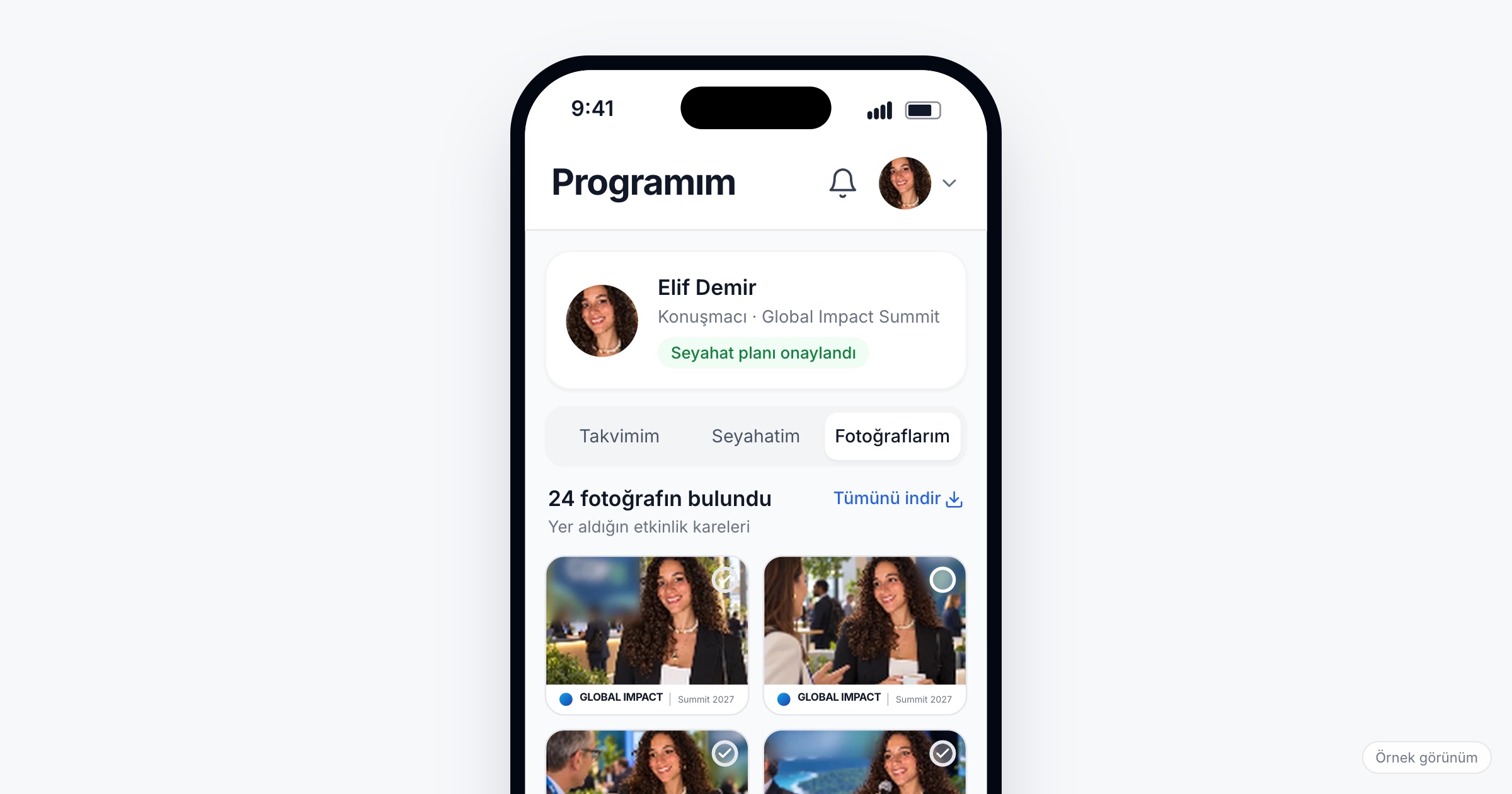
Event photo sharing is the work of getting the photos taken at a gala, product launch, dealer meeting or congress to the people who appear in them, fast enough that they share them while the event is still on their mind. It matters because a photo an attendee posts the same evening carries your event and your sponsors to people who were not in the room, while a photo left in a shared folder carries nothing. When you choose an event photo sharing app, check that photos can be uploaded during the event, that each attendee gets a personal gallery built with face recognition only if they opt in, that shared photos carry a thin event and sponsor frame, and that it all works inside the app attendees already use.
Why event photos die in a shared folder link
Picture a product launch for 600 dealers and partners. The photographer covers the arrivals at the branded wall, the reveal on stage, the general manager with the top dealers and the dinner: 2,000 frames by midnight. Ten days later a folder link goes out to everyone. A dealer from Bursa opens it, scrolls past a hundred photos of strangers and closes it. The one photo of them receiving the regional award is somewhere near frame 1,400.
Three things went wrong at once. The timing: the winner wanted to post that photo on the night, and ten days later the moment has passed. The search: a folder sorted by file name makes every attendee look through the whole event to find themselves. The sharing: the few who find a photo post a screenshot without the event name or the sponsor, and the folder hands everyone every photo, including ones nobody would post of themselves.
Award nights, kick-offs and incentive trips have the same problem. Congresses and conferences have it at a larger scale: speakers want their stage photo, delegates want a record of their sessions, and parallel halls produce more photos than anyone will scroll through.
What to look for in an event photo sharing app
1. Uploads while the event is still running
Most photos get shared the same evening; interest drops fast in the days after. On an incentive trip, people post from the dinner table. Your team should be able to upload photos in batches during the event, so the afternoon's photos are there before dinner.
Ask the vendor: Can we upload photos while the event is running? How soon after an upload do attendees see them?
2. A personal gallery instead of a shared folder
Each attendee should see the photos they appear in, in one place, and be able to download them all. That turns 2,000 frames into the fifteen that matter to one person.
3. Face matching only for people who opt in
Personal galleries work through face matching: the attendee takes a selfie, and the system compares it with the event's photos. That should be a choice, easy to decline; at a corporate event, an employee should not feel that saying no is noticed. Decide in advance what attendees who do not opt in get instead, for example photos your team shares through internal communications, and say so in the invitation.
Ask the vendor: Does face matching run for anyone who has not opted in? What does an attendee who has not opted in see in the photo section?
4. A thin event and sponsor frame
A frame turns a personal photo into a post that carries the event. Thin frames get shared: a narrow band with the event name and one or two logos at the edge. A heavy frame crowds the faces and looks like an advertisement, and people do not post advertisements of themselves. Put a sponsor's logo on the frame only when their package includes it.
Ask the vendor: Can we see the frame on real photos from our event, portrait and landscape, before we publish?
5. Sharing from the app attendees already have
Every extra download and sign-up loses people. Photos in the event app attendees already use for their program sit where people already look, and sharing one should take a single tap.
6. Sponsor visibility you can report honestly
Framed photos put a sponsor's logo into attendees' own feeds, a kind of visibility a banner cannot buy. Report it for what it is: a tap on share is not a published post, and a post is not a view. Report the figures your tool records, name each one plainly, and add tagged posts you can see yourself. Do not turn share counts into estimated reach; one inflated figure makes a sponsor doubt the whole report. See our sponsor report guide.
Ask the vendor: What exactly does your report count for photos, and what does each figure mean?
Briefing the photographer
Face matching can only find faces the photographer captured.
A shot list. Name the moments and people: arrivals at the branded wall, the stage reveal, each award winner with the presenter, team photos by region, people in front of the sponsor's backdrop. At a congress, every speaker at the lectern, not only the opening.
Faces in view. Shoot from the front. Three hundred heads from behind is not a photo anyone will share. A round of the dinner tables catches people who were never near the stage.
An upload rhythm. Agree on batches tied to the program: after the morning plenary, before dinner, right after the awards. Uploading everything at midnight misses the evening's shares.
Culling before publishing. Drop closed eyes, mouths full at dinner and blurred frames, and keep the best of five near duplicates. Someone on your team should look before photos go out, because attendees share what they are given.
Consent, in short
Face data is special-category personal data under Turkey's KVKK and biometric data under the GDPR, so face matching should be optional, asked per event and possible to withdraw. The organizer is the data controller and the app vendor the processor, which makes the privacy notice and the consent text the organizer's to prepare. This article is not legal advice; talk to your legal counsel about your own case.
Checklist before the event
- Write the shot list with the photographer: moments, people and sponsor backdrops.
- Agree on upload batches tied to the program, and name who checks photos before they are published.
- Design the frame with the event name and only the sponsor logos the packages include; test it on real photos.
- Prepare the privacy notice and the consent text for face matching.
- Decide what attendees who do not opt in get, and say so in the invitation.
- Agree with sponsors before the event what the photo figures in their report will mean.
- Plan a short announcement for the evening of the main moment: tonight's photos are in the app.
Common mistakes
- Sending one folder link a week later. The wish to share is strongest on the night, and a week later it has passed.
- Publishing every frame. Attendees find the worst photo of themselves next to the best one, and share neither.
- A frame that fills the photo. People share pictures of themselves, not posters with a face in the corner.
- Shooting the audience from behind. Face matching has nothing to find in a hall full of backs.
- Making matching feel mandatory. Consent an employee feels unable to refuse is not the consent you want.
- Promising sponsors reach figures. A number you cannot show costs the trust you need for next year's package.
How Eventiqs helps
On Eventiqs, photos run through the Smart Photo Sharing module (smart photo sharing). Organizers upload event photos from the panel, during the event too. Attendees who give explicit consent take a selfie in the app, and AI-powered face matching compares it with the event's published photos and shows the ones they appear in. Each attendee sees their shots in the My Photos tab under My Program, can download them all, and shares the photos they pick with the event and sponsor frame in one tap. The photos appear in the event app attendees already use, with no extra download or sign-up. Consent applies to that event only, and withdrawing it deletes the selfie and the photos found; the organizer is the data controller and Eventiqs the processor. For the rest of the setup, see corporate event apps and digital sponsorship revenue at events.