Event management dashboards: running the program, attendees and content from one panel
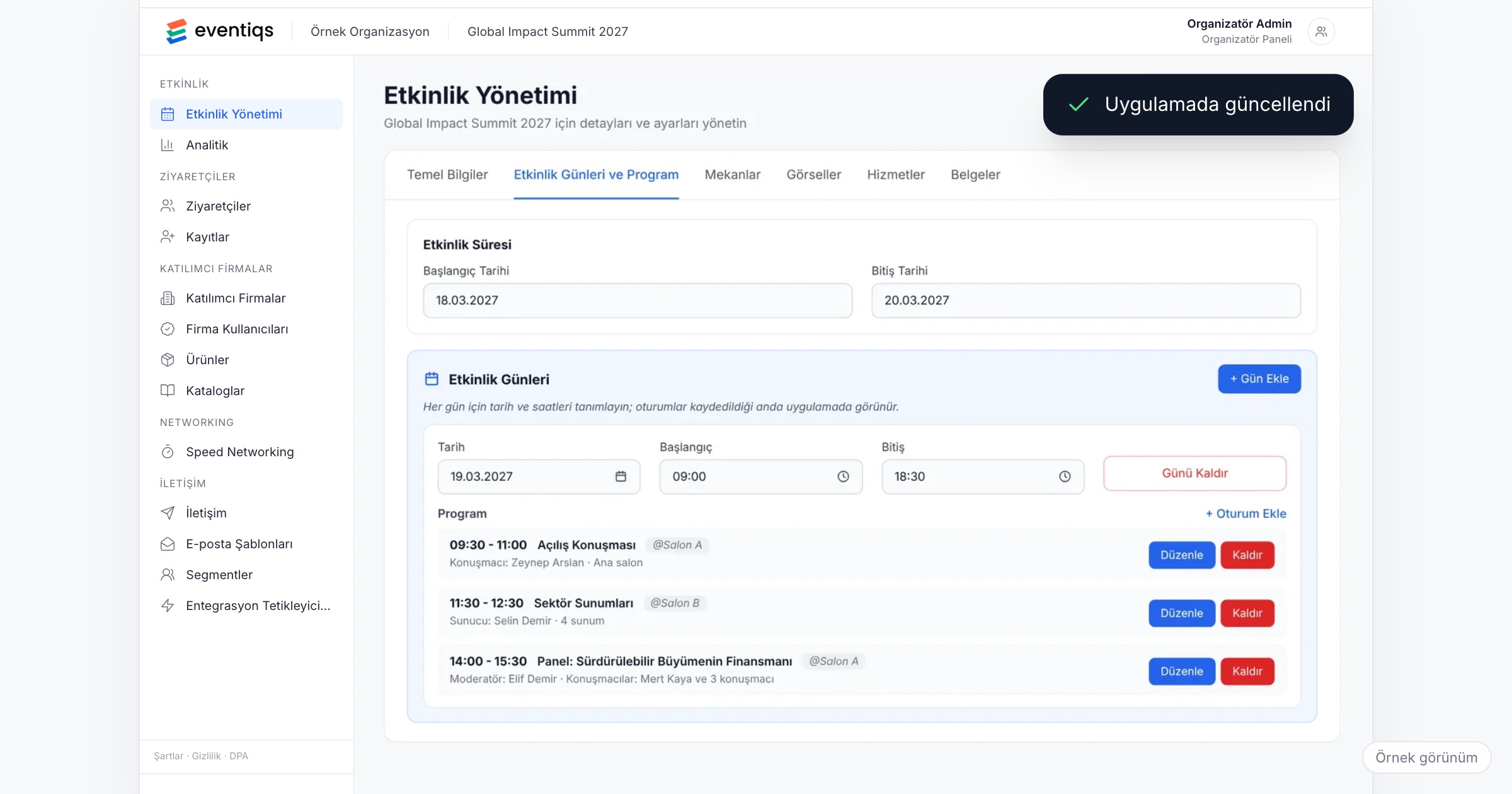
An event management dashboard, or organizer panel, is the one place where the organizing team sets up and runs an event: the program, the attendee list and its categories, travel data, content and documents, the modules the app offers and the messages that go out. It matters because a change made there reaches the attendee app directly, without another round of PDFs and email threads, and the team works from one list instead of five spreadsheets. When you choose an event management platform, check how the program and attendee data get in, whether changes appear in the app right away, whether modules can be turned on per event, and what the team can follow live on the day.
Why running events from spreadsheets breaks down
Take the internal events team of a manufacturer: three people who run a sales kick-off in January, a dealer meeting in spring and a product launch in the autumn. For each event, the program lives in a document revised a dozen times, and HR, sales operations and the travel agency each keep their own copy of the attendee spreadsheet. Flights arrive by email, the floor plan as a PDF, and announcements go to a messaging group half the dealers have muted.
A week before the dealer meeting, the keynote moves by thirty minutes. The team exports a new PDF, emails it to 350 people and posts it in the group; on the day, some dealers still have the old version, and the same question arrives in three inboxes. Afterwards, management asks how many meetings took place, and someone counts by hand.
With a small team the problem is rarely effort. It is that every change has to be made in several places, and each copy drifts a little further from the others.
What an event management panel should cover
1. The program: days, sessions, halls and speakers
Each session is tied to a day, a hall and its speakers. When a session moves, the change should appear in the attendee app right away, so the stage, the app and the team show the same time.
Ask the vendor: When we move a session in the panel, when does the attendee see it? Do we have to publish anything separately?
2. Attendees, categories and personal details
The attendee list belongs in the panel, not next to it: each person with a category (employee, dealer, partner, speaker, guest) and the personal details the event needs. Nobody loads 350 people one by one, so bulk upload matters, and so does fixing a single record afterwards.
Ask the vendor: Can we bulk upload the attendee list from a spreadsheet? How do we correct one person after the upload?
3. Travel data
For a kick-off abroad or a dealer meeting in another city, flights, hotels and transfers are the details people ask about most. Travel data should load in bulk alongside the attendee list, and each person should see only their own plan. Our post on corporate event travel covers what that plan should contain.
4. Content and documents
Venue maps, service information and useful links answer the questions your team would otherwise answer one by one: where the shuttle leaves, what the Wi-Fi password is. They belong in the same panel as the program.
5. Modules turned on per event
A kick-off, a dealer meeting and a launch do not need the same app. The kick-off may need the program, travel and photos; the dealer meeting adds speed networking. Turn modules on for each event, and the app attendees see should follow that choice, so nobody opens an empty tab.
Ask the vendor: Can we turn a module on for one event and leave it off for another? What does the attendee see when a module is off?
6. Photos and speed networking
Some modules need the organizer's hand during the event. Photos should be uploadable from the panel while the event is still running, not only afterwards. A speed networking session (the participant pool, invitations, the match matrix by round and table, and publishing the plan) should be set up in the same panel as the rest of the program.
7. Communication
Announcements should go out from the panel by email or push, to everyone, one category or named people. Reminders you know you will need (the evening before, an hour before dinner) are better scheduled in advance, and delivery and click rates show whether a message reached people.
Ask the vendor: Can we schedule reminders before the event starts? Which numbers do we see for each send?
8. Live indicators and reports
On the day, the team should see what is happening: active users, meetings, QR scans and messages. Afterwards, reports by stakeholder (attendees, sponsors, exhibitors separately) answer management's questions without manual counting and feed the planning of the next edition; our post on measuring corporate events goes further.
Who owns what on the team
A panel works well when each part of it has one owner. With a team of three or four:
- Program owner: sessions, halls and speakers. The only person who changes the program, so the app and the stage stay in step.
- Attendee and travel owner: the invite list, categories and the travel agency's data, including corrections after the bulk upload.
- Content and communication owner: documents, maps, links and the schedule of emails and push notifications.
- On the day: one person watches the live indicators and sends announcements; another uploads photos.
Attendee data in the panel
The panel holds names, contact details, categories and travel bookings. For this data the organizer is usually the data controller and the platform vendor the data processor. Under Turkey's KVKK and the GDPR, collect only what the event needs and tell attendees in the privacy notice what you hold and why. This article is not legal advice; talk to your legal counsel about your own case.
Ask the vendor: In which region is the data stored? Is it encrypted in transit and at rest?
Checklist before the event
- Eight weeks out: hold the planning meeting, decide which modules this event uses and agree the attendee categories.
- Seven weeks out: send the event's name, logo and colors, so the app's look is configured during setup.
- Six weeks out: build the program draft in the panel and open registration or load the invite list.
- Four weeks out: bulk upload travel data from the agency and check a few plans against the tickets.
- Three weeks out: add venue maps, services and useful links.
- Two weeks out: schedule reminders and set up speed networking invitations if the event has them.
- One week out: test the app with one colleague from each category, and agree that late changes go through the program owner.
- On the day: keep the panel open on the live indicators, and upload photos as they come in.
Common mistakes
- Keeping a master spreadsheet next to the panel. Two lists drift apart within a week, and nobody knows which one is right.
- Changing the program in two places. If the stage script and the panel disagree, attendees believe whichever they saw last.
- Turning on every module just in case. Empty tabs make the app look unfinished.
- Loading travel data the night before. Questions about flights and hotels start days before the event.
- Sending every announcement to everyone. A change that concerns twelve people should reach twelve people.
How Eventiqs helps
On Eventiqs, the organizer runs the event from the Organizer Panel (organizer panel): days, sessions, halls and speakers; attendee and travel data with bulk upload, categories and personal details; and content and documents such as venue maps, services and useful links. Program changes made in the panel appear in the app right away. Modules are turned on per event, and the app attendees see follows that choice. Photos are uploaded from the panel, also during the event; speed networking sessions are set up there; segmented email and push go out by category or by person, with delivery and click rates for every send; and live indicators show active users, meetings, QR scans and messages, with reports by stakeholder alongside them. During setup, the app's look is configured to your event's identity. For how this comes together at a company event, read our post on the corporate event app.