Floor plans in an event app: helping attendees find halls, booths and meeting points
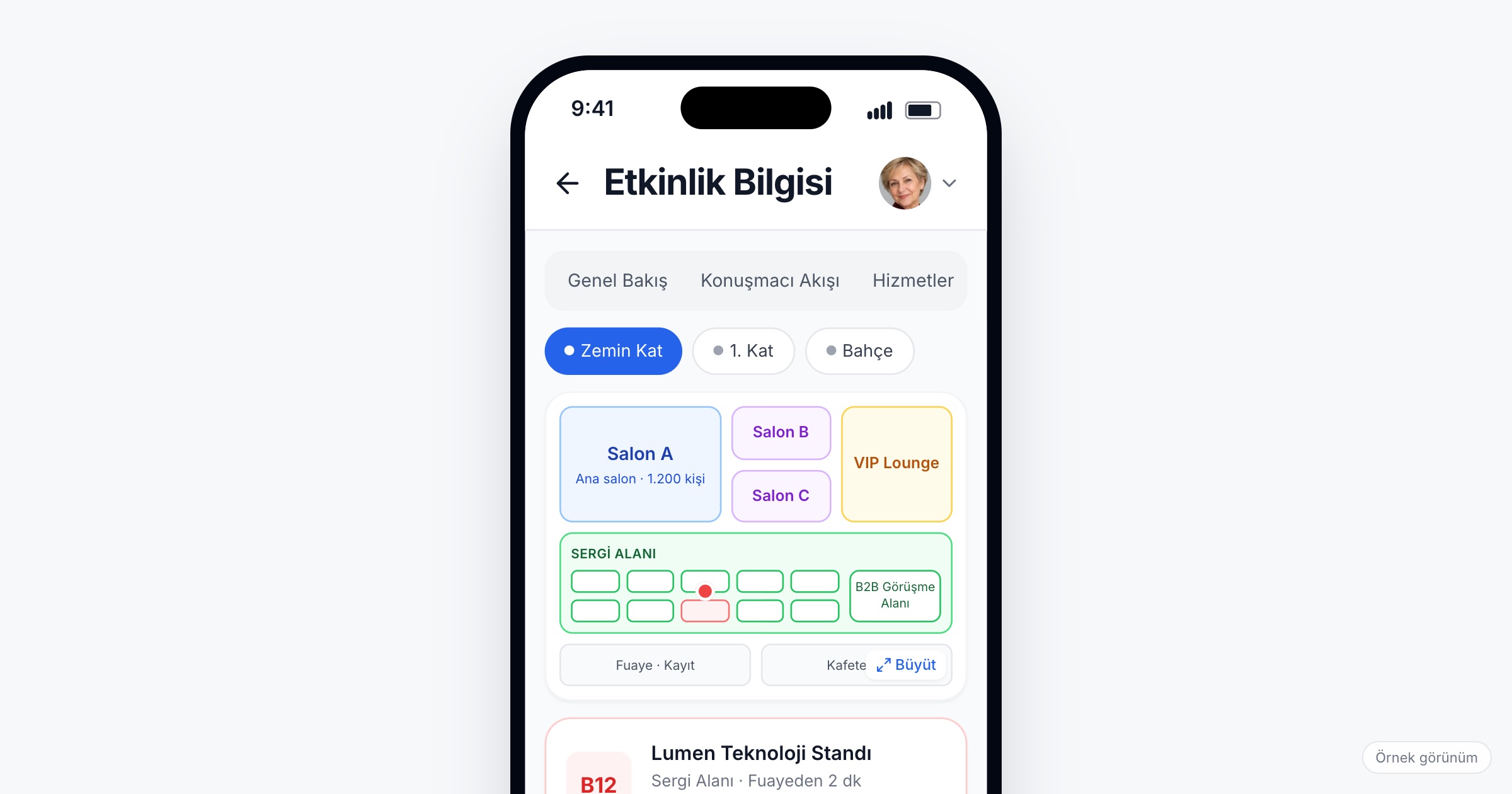
An event floor plan app puts the venue map on every attendee's phone: plans split by floor and area, with the halls, the exhibition area and the service points, and a search that marks the hall or company someone is looking for on the plan. It matters most where the venue is large and the day moves fast: a convention center with a dozen halls, a fair ground with hundreds of booths, a hotel with meeting rooms on three floors. When you choose one, check whether plans can be split by floor and area, whether search marks both halls and exhibitors on the plan, whether you can add your own maps for places outside the venue, and how much work it takes your team to prepare all of it before the doors open.
Why finding your way at an event is hard
Picture a 400-person dealer meeting in a resort hotel. The plenary is in the ballroom on the ground floor, the regional breakouts are in meeting rooms spread over the first floor and the floor below the lobby, and lunch is served in a restaurant across the garden. The agenda says "Breakout B"; the sign on the door says the room's own name, the one the hotel gave it. Ten minutes into the session, dealers are still walking the corridors and asking the waiters.
At a product launch, dealers, the press and managers each need a different route through the same building.
An incentive trip moves the problem outside. A group of 120 people has a meeting point at the hotel's side entrance for the boat tour, dinner at a restaurant in the old town, and a bus pickup in a square the next morning. The printed card in the welcome pack shows all three; by day two most of those cards are in a drawer.
At a trade fair or a congress, the scale grows. Visitors look for a company, not a booth number, and do not know if it is in Hall 7 or Hall 9. Congress delegates hunt for the poster area, and the information desk answers the same "where is..." question all day.
Behind all of these scenes are the same limits: a printed map is fixed the day it goes to print, signage cannot change when a room is swapped the night before, and an information desk only helps the people standing in front of it.
What to look for in an event floor plan app
1. Plans by floor and area
One image of the whole venue is hard to read on a phone. The app should let you split the venue into floors and areas (ground floor halls, upper floor meeting rooms, the exhibition area, the outdoor space) so attendees move between them instead of zooming into one huge file.
Ask the vendor: Can we add a separate plan for each floor and area? Can halls, the exhibition area and service points sit on the same plan?
2. Search that marks the place on the plan
Most attendees do not want to read a map; they want to find one thing. They type a hall or company name, and the app should mark it on the plan. At a fair, that means a visitor finds an exhibitor's booth on the plan without asking anyone. At a dealer meeting, it means a dealer can find the breakout room from its name in the agenda.
Ask the vendor: Can attendees search for both halls and companies? Is the result marked on the plan itself, or only listed?
3. Service points on the same plan
The questions an information desk hears most often are rarely about the program: the registration desk, the cloakroom, the toilets, the prayer room, the first aid point, the meeting area, the charging station. Put them on the plan next to the halls, and many of those questions answer themselves.
4. Names that match the program
A floor plan only helps if the names on it match the names attendees see elsewhere. If the agenda says "Hall A", the plan says "Ballroom" and the door says "Istanbul", people get lost even with a perfect map. Agree on one name per room with the venue, and use it in the program, on the plan and on the signs. A program that filters by hall and location then works hand in hand with the plan.
5. Maps beyond the venue
Corporate events rarely stay inside one building: incentive trips have meeting points around the city and off-site dinners, and launches sometimes add a test drive area or a showroom visit elsewhere. The app should let you add your own maps and visuals for these places, so attendees find the venue plan and the city meeting points in the same place.
Ask the vendor: Besides the venue plan, can we upload our own maps and visuals, such as a map of meeting points?
6. Booth details kept in step with the exhibitor list
At a fair, the trade show floor plan and the exhibitor list are two views of the same information. A company's booth number and hall should appear on its profile and match the plan; when an exhibitor moves a week before the fair and only one of them changes, visitors walk to an empty stand.
Ask the vendor: Where do booth details live, and who updates them when a company moves?
7. Access on every phone
Not every attendee installs an app, especially at a one-day corporate event. The floor plan should be available on iOS, Android and the mobile web, so a dealer who opens a link from an email sees the same plan as a colleague who installed the app.
8. Work your team can actually do
Someone has to get the drawings from the venue, mark halls and service points and check names against the program. Name an owner and give them time; a plan finished the night before is a plan nobody has checked on site.
Ask the vendor: In what form do we deliver the plans, and who on your side helps us set them up?
Checklist before the event
- Get the latest floor drawings from the venue, for every floor and area you will use.
- Agree on one name for each hall and meeting room, and use it in the program and on the signs.
- Mark the service points: registration, cloakroom, first aid, prayer room, meeting area.
- At a fair, load booth numbers and halls with the exhibitor list and check them against the plan.
- For incentive trips and off-site parts, prepare a map of every meeting point with the time attendees need to be there.
- Walk the venue with the plan on a phone the day before, and fix what does not match.
- Tell attendees where the plan is in the invitation email and at the registration desk.
Common mistakes
- Uploading one huge image. A full-venue drawing at phone size shows nothing readable; split it by floor and area.
- Using the venue's room names in one place and your own in another. Attendees end up with three names for the same room.
- Forgetting service points. Without them, the information desk keeps answering the same questions the plan could have answered.
- Leaving the city out. On an incentive trip, the meeting point for the morning bus matters as much as the hotel's meeting rooms.
- Keeping the plan a secret. If attendees do not know the plan is in the app, they will still queue at the desk.
How Eventiqs helps
The Eventiqs Floor Plan module shows plans by floor and area, with halls, the exhibition area and service points on one plan, and the hall or company an attendee searches for is marked on it. Maps and visuals you upload, such as venue maps or meeting points for an incentive trip, sit in the same place, managed from the organizer panel. Exhibitor profiles carry booth details, and the program filters sessions by hall and location, so the names attendees see on a company page or in the agenda can be searched on the plan. Attendees use the same app on iOS, Android and the mobile web. For how the floor plan fits into a full setup, read our posts on corporate event apps and trade show apps.