Event agenda apps: keeping a multi-hall program current through last-minute changes
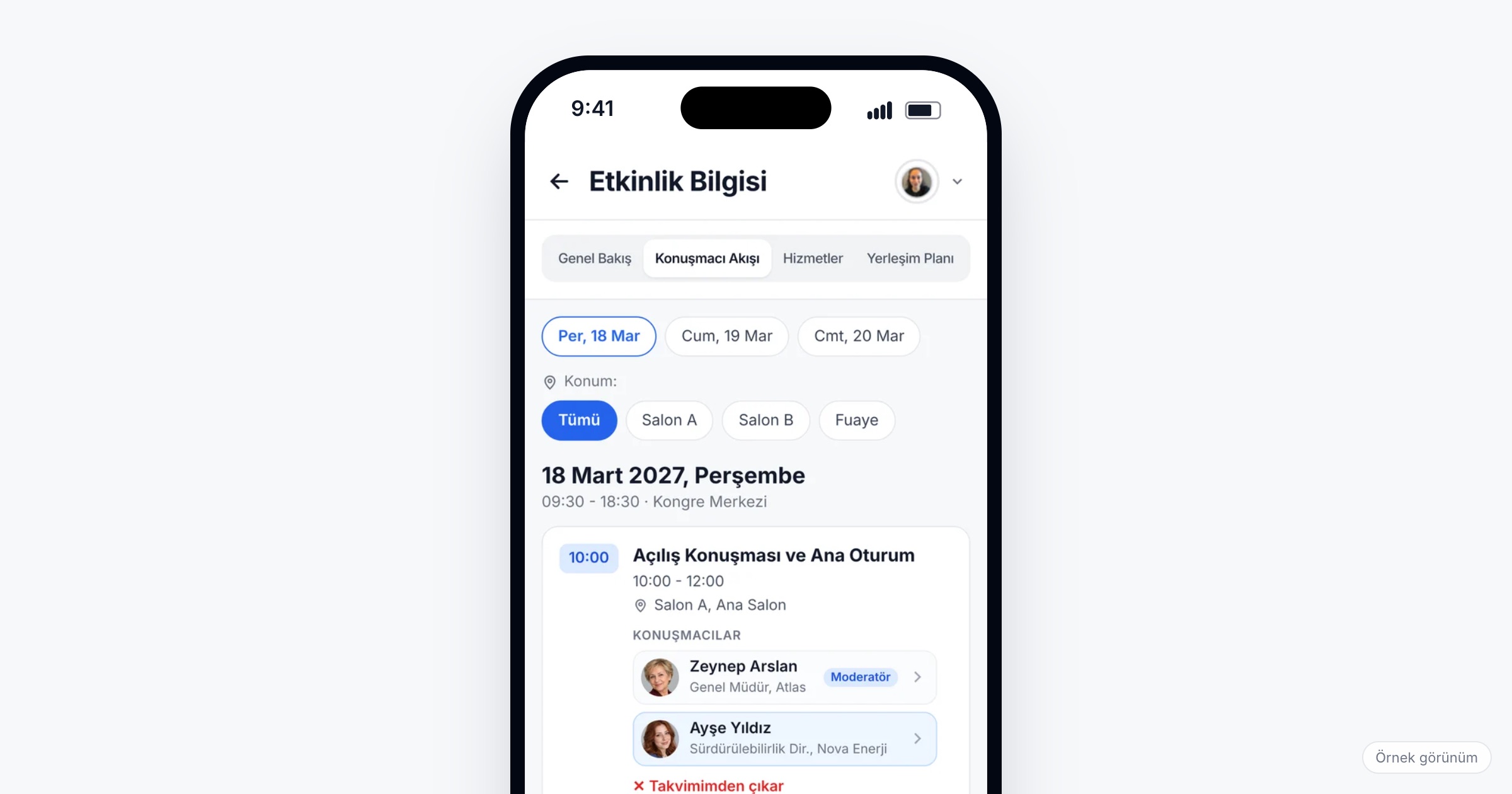
An event agenda app puts the whole program of a congress, conference or corporate event on attendees' phones: every session by day and hall, the speakers behind them, and the changes your team makes after the program has gone to print. It matters because a multi-hall program rarely survives the first morning unchanged; a speaker's flight is late, a workshop outgrows its room, a panel swaps places with a keynote. When you choose one, check how the program is structured (days, halls, sessions), how attendees search and filter it, what a speaker's page shows, and how quickly a change made by your team reaches every phone.
Why a multi-hall program is hard to keep current
The program is usually the first thing finished and the first thing that goes out of date. At a three-day congress with six parallel halls, the printed booklet goes to the printer a week before opening. By the first coffee break, one session has moved from Hall B to Hall D because a projector failed, a moderator has been replaced, and a satellite symposium has been added at lunch. The booklet still says Hall B, and so does the PDF in last month's email.
Corporate formats have the same problem under different names. A sales kick-off opens with a plenary for 600 people and then splits into eight parallel workshops by region and product line. A product launch runs three programs side by side: product training for dealers, a press conference and interviews for journalists, and a strategy session for managers. A town hall looks simple until the CEO's slot moves forward by 40 minutes and the Q&A is cut in half. In each case someone at the registration desk spends the day answering "where is my session?", and a whiteboard next to the escalator becomes the real program.
Two smaller frustrations add up. A PDF program cannot be searched in any useful way on a phone; scrolling through 40 pages to find one speaker's session is slow in a crowded foyer. And attendees who want to know who a speaker is open a browser, search the name and land on an old profile on someone else's site.
What to look for in an event agenda app
Whether you call it a conference agenda app or an event program app, the questions are the same: how the program is held, how people find their way through it, and what happens when it changes.
1. A program built from days, halls and sessions
The app should hold the program as structured data rather than as a document: each session has a day, a start and end time, a hall and its speakers. That structure is what makes filtering, speaker pages and quick changes possible. If the vendor loads your program as a PDF or an image, every change means a new file.
Ask the vendor: Who builds the program in the system, and from what source? Can we add a day, a hall or a session ourselves after the program is published?
2. Filtering by date, hall and location
An attendee standing in a foyer wants to know what is on in the next hour, or what is happening in the hall in front of them. Filters by date, hall and location answer both questions in a few taps. At a venue spread over two buildings, filtering by location saves a walk to the wrong wing.
3. Changes that reach the app as soon as you make them
This is what separates an agenda app from a digital booklet. When your team moves a session or changes a speaker in the panel, the app should show the new hall and time right away, without anyone downloading a new version. Test it during the demo: make a change in the panel and watch a phone.
Ask the vendor: How long does a change in the panel take to appear in the app? Do the mobile app and the web version update at the same time?
4. Announcing the change, not only making it
An updated program helps only the people who look at it. For a hall change or a delay, a push notification to the people affected is what gets them moving. If your program has tracks for different groups (dealers, press, managers), being able to notify one category instead of everyone keeps the rest of the audience from tuning out.
Ask the vendor: Can we send a push notification to one attendee category only? Do we see how many people received it and how many clicked?
5. Speaker profiles inside the program
From any session, one tap should open the speaker's profile: photo, title and a short bio. Attendees choose between parallel sessions partly by who is speaking, and a profile next to the session saves them a web search. Collect bios and photos from every speaker in one format, well before the event.
6. A program that fits several audiences
Corporate events often run parallel tracks for groups that do not need the same content. Look at how the vendor handles attendee categories (employee, dealer, press, speaker, guest) and how the program reads for someone who cares about one track only.
Ask the vendor: How do attendee categories affect what each group sees in the app?
7. Halls people can find
A session in "Hall 3B" means nothing to someone at the venue for the first time. The program should go together with a floor plan on which the hall is marked, and venue maps should live in the app rather than on a sign by the entrance.
8. Room for each attendee's own day
The shared program is the base layer; each attendee builds a day from it. Check that sessions chosen from the program move into a personal calendar with reminders. We cover that side in personal event agendas.
Checklist before the event
- Give the program one owner; changes go through that person and the panel, not through email threads.
- Name halls and locations the same way in the program, on signage and on the floor plan.
- Collect speaker photos, titles and bios with one template and a deadline weeks before the event.
- Enter the full program by day and hall, breaks and lunch included, and check it on a phone.
- Decide which changes call for a push notification and who on your team sends it.
- Make a test change on the rehearsal day and confirm it reaches phones.
- Print less: a one-page overview with a QR code that opens the app, instead of a full booklet.
Common mistakes
- Treating the printed program as the source of truth. Once the event starts, the booklet is a snapshot; the app has to be where changes land first.
- Changing the program without telling anyone. A hall change that only appears in the program reaches whoever happens to look; send a notification when a change affects where people need to be.
- Notifying everyone about every change. A dealer does not need to know that a press interview moved; target notifications, or people switch them off.
- Leaving speaker bios to the last week. Missing photos and one-line bios make the program look unfinished and send attendees back to web searches.
- Using different hall names in different places. If the program says "Salon A" and the sign says "Hall 1", people get lost however current the app is.
How Eventiqs helps
On Eventiqs, the program runs on Speaker Flow and the Organizer Panel (speakers and program). Your team manages days, sessions, halls and speakers in the panel (organizer panel), and changes made there appear in the app right away. Attendees see the program by day and hall, filter sessions by date, hall and location, and open a speaker's profile with photo, title and bio in one tap. Push notifications segmented by category or by person tell the right group about a change, with delivery and click rates reported for every send, and the floor plan marks the hall an attendee searches for. For how sessions become each attendee's own day, read personal event agendas; for the wider picture at scientific meetings, see what to look for in a congress app.