Corporate event travel management: flights, hotels and transfers for every guest in one app
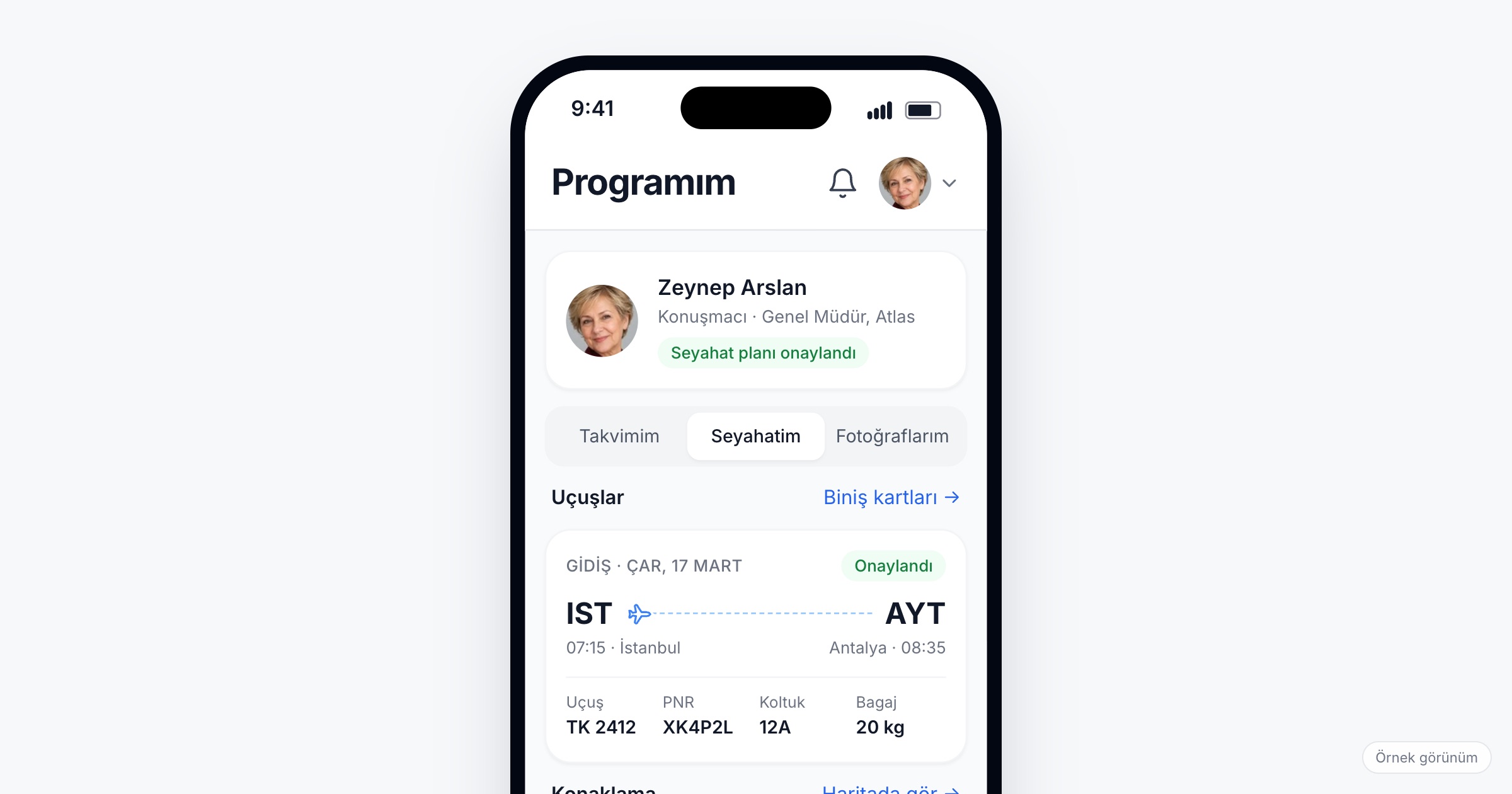
Corporate event travel management is the work of getting every invited guest to an incentive trip, a dealer meeting in another city or an international kick-off, and of making sure each of them knows their own flight, hotel and transfer without asking anyone. It matters because travel is where most of the questions, the late changes and the personal data of a corporate event sit. When you choose a tool, check that each guest sees only their own plan, that every leg and every hotel night is in it with the details a traveller actually needs, that times show in local time, and that you can load the travel agency's data in bulk.
Why travel makes corporate events hard
Picture an incentive trip for 150 top-performing dealers. They fly from three cities on different days, a few drive in, two invited speakers arrive by train from a neighbouring country, and the CEO comes a day late. The travel agency sends tickets as separate emails, the hotel sends a rooming list as a spreadsheet, the transfer company sends its own schedule as a PDF. By the week of the trip, your team holds the only complete picture, spread across a dozen files.
Then the questions start. "What time is my flight?" "Which hotel am I in?" "When does the bus to the venue leave?" The same three questions arrive by email, by phone and in a messaging group, often from people who had the answer in an attachment they never opened. On an international kick-off, timezones add their own trouble: a ticket printed in one country's time, an agenda written in another, a guest who sets an alarm an hour wrong.
The hardest part is change. A flight is moved, a room type changes, the transfer leaves twenty minutes earlier. The PDF you sent last week is now wrong, and you cannot be sure who has the new one.
What to look for in attendee travel management
1. One plan per person, visible only to that person
Each guest should open the app and see their own trip, nothing else. That keeps the screen short and useful, and it keeps one guest's flight number, hotel and room out of another guest's hands.
Ask the vendor: Who can see a guest's travel details besides the guest? Can one guest ever see another guest's plan?
2. Every leg, whatever the mode
Not everyone flies. A real plan covers flights, trains, buses and people driving their own car, each marked as outbound or return. For each journey, the guest needs the carrier, the flight or train number, the PNR, the seat and the baggage allowance; those are the details they are asked for at the airport.
3. Hotel details a guest can act on
"Hotel booked" is not enough. The guest needs the hotel name, check-in and check-out dates, the address with a map link, the room type, the confirmation number to give at reception, and how far the hotel is from the venue.
4. Transfers and car rental
Each transfer should show its meeting point, time and a map link. Guests who rent a car need the pickup and drop-off places and times in the same plan.
Ask the vendor: Can transfers and car rentals sit in the same plan as flights and hotels, or do they live somewhere else?
5. Local times, shown as local
A guest flying from Istanbul to Lisbon should see the departure in Istanbul time and the arrival in Lisbon time, the way the ticket and the airport show them. A tool that converts everything to the organizer's timezone creates exactly the mistake you are trying to avoid.
6. A status on every item
Travel is confirmed in stages. Marking each item as pending, confirmed or cancelled lets you publish the plan early, while the return flight is still being booked, without misleading anyone. A cancelled item that stays visible as cancelled is clearer than one that quietly disappears.
7. Bulk loading from the agency's data
Nobody should type 150 itineraries by hand. Your team should be able to load guest and travel data in bulk, ideally from the spreadsheet the agency already produces.
Ask the vendor: In what format do you take travel data? How do we correct a single guest's plan after the bulk upload?
8. A way to reach the people a change affects
When a flight moves, the twelve people on it need to hear about it, not all 150 guests. Being able to send a push notification or an email to selected people, or to one category, keeps changes from turning into noise.
Ask the vendor: Can we send a notification to specific named guests? Is a change to a travel item announced automatically, or do we send that message ourselves?
Travel details are personal data
A travel plan holds names, flight and booking references, hotel and room details and dates of movement; on international trips, the agency may also hold passport details. For this data the organizing company is usually the data controller, and the app vendor acts as the data processor. Under Turkey's KVKK and the GDPR, that means you decide what is collected and why, you tell guests in a privacy notice, and you collect only what the trip needs. This article is not legal advice; talk to your legal counsel about your own case.
Ask the vendor: In which region is the data stored? Is it encrypted in transit and at rest? When is travel data deleted after the event?
Checklist before the event
- Agree with the travel agency on one spreadsheet format for flights, trains, hotels and transfers, per person.
- Ask the hotel for a rooming list with room types and confirmation numbers.
- Collect transfer meeting points and times, with an exact address for each.
- Load guest and travel data in bulk, then check a sample of plans against the original tickets.
- Mark anything not yet booked as pending, and publish the plan anyway.
- Decide who on your team corrects travel items and who tells affected guests about a change.
- Prepare the privacy notice that covers travel data.
- Tell guests where to find their plan in the invitation email, days before departure.
Common mistakes
- Sending one PDF to everyone. Guests scroll through 150 itineraries to find their own, and see everyone else's on the way.
- Using a messaging group as the source of truth. Updates get buried under replies, and guests who joined late never see the earlier ones.
- Writing every time in the organizer's timezone. Guests compare the agenda with their ticket and trust the wrong one.
- Waiting until everything is confirmed. A plan published early with clear pending items answers more questions than a perfect plan published the night before.
- Forgetting transfers. A guest with a flight and a hotel but no transfer time still calls your team at the airport.
- Treating travel data as harmless. Booking references and room numbers are personal data, and they belong only in the guest's own plan.
How Eventiqs helps
On Eventiqs, travel runs through the My Travel module (travel in the event app). Each guest sees their own plan in the app, and only that person sees it. Journeys by flight, train, bus or own car are marked outbound or return, with carrier, number, PNR, seat and baggage. Accommodation shows the hotel name, check-in and check-out dates, address, map link, room type, confirmation number and distance to the venue; car rentals show pickup and drop-off places and times, and transfers show place, time and a map link. Each item has a status (pending, confirmed, cancelled), and times are shown in the local timezone of the place. Organizers load visitor and travel data in bulk in the Organizer Panel (organizer panel) and can send email and push by category or by person. Data is stored in AWS Frankfurt and encrypted in transit and at rest; the organizer is the data controller and Eventiqs is the processor. For the rest of the corporate event setup, see corporate event apps and invite-only event registration.