Networking at corporate events: helping dealers, partners and teams meet the right people
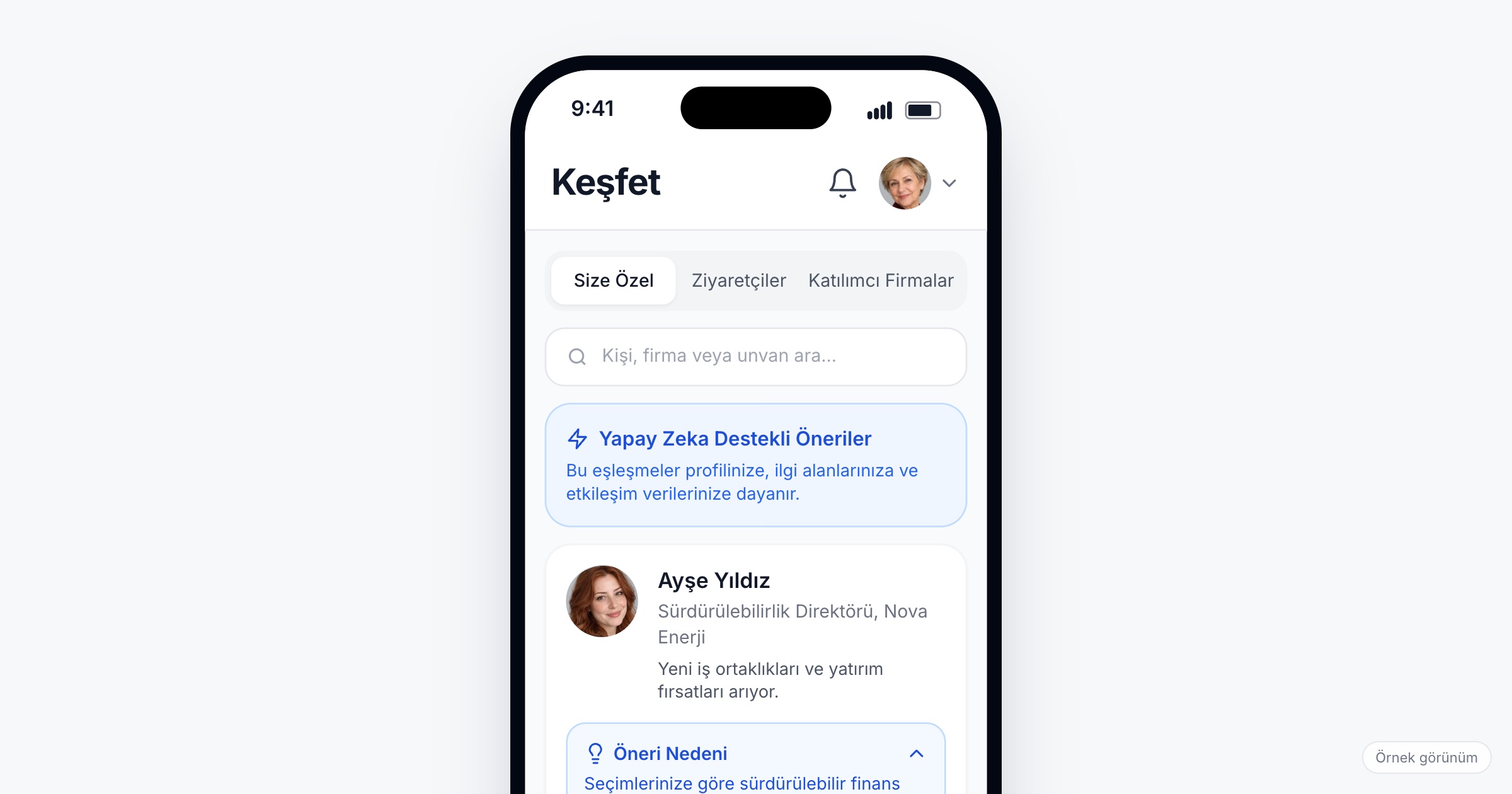
Corporate event networking means helping the people a company brings together (dealers, partners, suppliers, regional teams, new hires) meet the people who matter to their work during a dealer meeting, customer summit or kick-off. It matters because these events are often the only time in the year these people share a room, and a meeting that does not happen there rarely happens later. When you choose a networking app for events, check for a directory searchable by category, suggestions that show their reason, connection and meeting requests that the other side confirms, messaging that does not expose phone numbers, and a quick way to save someone met in the corridor.
Why networking at a corporate event is different
At a trade fair, two sides come to find each other: buyers and exhibitors, strangers with a commercial reason to meet. At a corporate event the audience is invited, and the relationships already exist on paper. A dealer from Konya has worked with the company for eight years but has never met the product manager whose decisions shape their price list. A supplier at a customer summit wants twenty minutes with procurement, not a seat at the gala dinner next to someone from marketing. Regional sales teams in Istanbul, Ankara and Baku have exchanged hundreds of emails and still cannot put faces to names. At a kick-off, new hires know their own manager and nobody else.
The problem is rarely a shortage of people; it is finding the right one in a crowded room in little time. A 400-person dealer meeting has a full plenary program and a dinner; meetings happen in the short gaps between them. Headquarters staff are the scarce side: every dealer wants the sales director, and the sales director cannot see everyone. Without some structure, the most outspoken dealers get the meetings and the quieter ones go home with the questions they never asked.
There is a confidentiality side as well. Dealers in neighbouring regions compete with each other, a partner list is commercially sensitive, and employees may not want their personal phone number in the hands of 300 people. Networking at a corporate event has to work without turning everyone's contact details into a shared spreadsheet.
What to look for in a networking app for events
1. A directory you can search by category
Attendees should be able to find people by who they are at this event: dealer, partner, supplier, speaker, VIP, headquarters team. Search by name, organization and title covers the rest, so a dealer looking for whoever handles warranty claims can search by title instead of asking around at lunch.
Ask the vendor: Which categories can we filter the directory by? Can we decide which categories appear in it?
2. Suggestions that explain themselves
A list of 400 profiles is not networking. Suggestions built from each person's profile and goals save the scrolling, but only if they show why. "You both work on retail in the Aegean region" is something a dealer can act on; an unexplained name is not. A suggestion is a starting point, and the person still decides whom to contact.
Ask the vendor: What data do the suggestions use? Does every suggestion show its reason?
3. Connection requests the other side accepts
At a corporate event, a connection should be mutual. A request that the other person has to accept keeps senior staff from being flooded, and keeps dealers from adding each other without their knowledge.
4. Messaging without sharing phone numbers
Most messages during an event are short: "I am at the coffee area next to hall B", "can we move to 15:30?". In-app messaging lets people write without handing out a personal number, which matters when one side is an employee and the other an outside dealer or supplier.
5. Meeting requests that land in the calendar
A meeting request should carry a time slot, and once the other side confirms it, the meeting should appear in both people's calendars with its place. A dealer who asked to meet the regional manager should not have to dig the time out of a chat thread. This is the step that turns "we should talk" into twenty minutes at a table.
Ask the vendor: Can the person sending the request choose a slot? Where does a confirmed meeting appear, and does it show the place?
6. QR to save the person you met in the corridor
Many useful conversations are unplanned: in the coffee queue, on the shuttle, after a breakout session. Each attendee should have a personal QR code in the app, and one scan should save the other person as a connection. A private note written on the spot ("send the new catalog to the Izmir branch") is what makes the contact useful a week later.
7. A plan for headquarters' time
Headquarters teams are the side everyone wants to meet. Ask them to set aside the hours they can give to meetings, and decide early whether dealers send requests to individuals or to teams. Where the demand is predictable (every dealer should see their regional manager once), a planned session works better than open requests; we cover that in speed networking at corporate events.
Protecting attendee data while people network
Networking puts people's names, titles, organizations and interests in front of other attendees. For this data the organizing company is usually the data controller, and the app vendor acts as the data processor. Under Turkey's KVKK and the GDPR, the privacy notice should tell attendees what their profile will show and to whom. Collect only the profile fields you actually use, and decide whether dealers should see each other or only headquarters staff. In-app messaging lets people talk without exchanging phone numbers or email addresses, so sharing contact details stays each person's own choice. This article is not legal advice; talk to your legal counsel about your own case.
Ask the vendor: In which region is the data stored? Is it encrypted in transit and at rest? Can we control which categories see each other?
Checklist before the event
- Define attendee categories (dealer, partner, supplier, speaker, VIP, headquarters) and collect them at registration.
- Ask for the profile fields networking needs: region, role, product lines and what each person wants from the event.
- Agree with headquarters teams which hours they keep free for meetings.
- Set up meeting areas or numbered tables with names people can find.
- Open the app with the invitation, so requests start before the first day.
- Tell attendees how to show their QR code and where to find their meetings.
- Prepare a privacy notice that explains what profiles show.
Common mistakes
- Treating the gala dinner as the networking plan. A seating chart decides who sits together, not who gets the meeting they came for.
- Leaving headquarters unprepared. Managers who do not expect requests leave them unanswered, and dealers soon stop sending them.
- Sharing a contact spreadsheet. It travels further than you intend, and dealers in competing regions see each other's details.
- Asking only for a name and an email. Suggestions and search have nothing to work with.
- Opening networking on the morning of the event. The gaps between sessions are too short to start planning meetings in.
How Eventiqs helps
On Eventiqs, networking at a corporate event runs on four modules, Smart Matching, Visitor Directory, Messaging and Meeting Requests and QR Connections, in the same app as the program and the travel plan. The Visitor Directory lists attendees filtered by category and sector, with search by name, organization or title; each profile shows interests, and connecting, messaging or requesting a meeting takes one tap (visitor directory). Smart Matching uses AI to suggest people and companies from each attendee's profile, goals and in-app engagement, showing the reason and a match score for every suggestion (smart matching). A connection is made once the other side accepts, attendees message each other without sharing contact details, and a meeting request carries a chosen slot; once confirmed, the meeting is added to the calendar with its time and place (messaging and meeting requests). Every attendee has a personal QR code, and one scan saves the profile as a connection, with a private note only the writer sees (QR connections). Read more in our post on the corporate event app and our B2B matchmaking guide.