B2B meeting scheduling at events: requests, time slots and meeting places
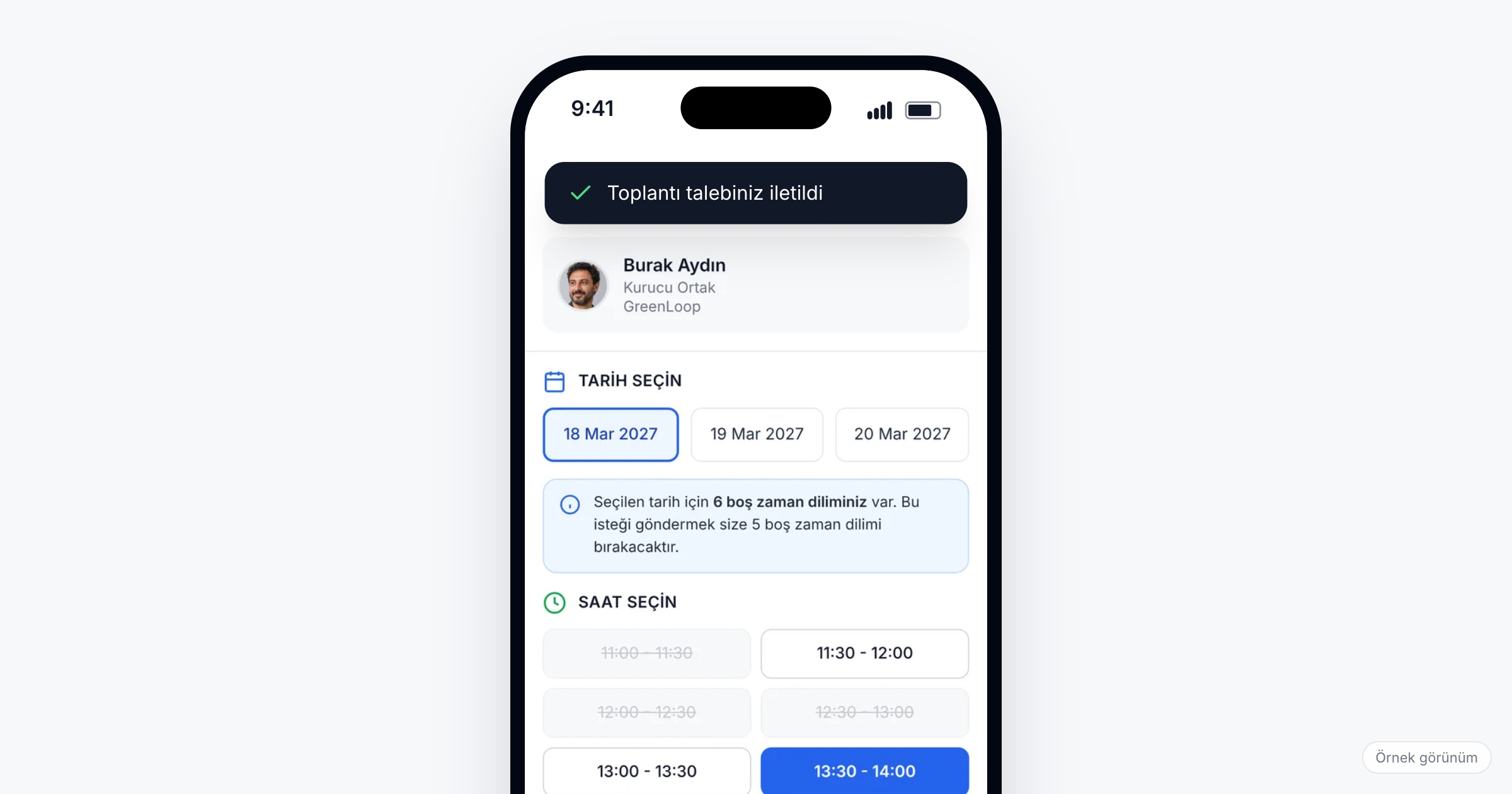
B2B meeting scheduling at an event is the work of turning "we should talk" into a one-to-one meeting with a set time, a set place and two people who both agreed to it, at a trade fair, a dealer meeting or a customer summit. It matters because the meetings people travel for are the ones least likely to happen by chance: the buyer, the product manager or the partner's decision maker has a full day, and a meeting without a time and a place is easy to lose. When you choose a meeting scheduler for events, check that a request carries a time, that unavailable times are visible before anyone asks, that a place is chosen with the time, that the other side can accept, decline or ask for another time, and that a confirmed meeting lands in both calendars.
Why one-to-one meetings at events are hard to schedule
Take a trade fair. An exhibitor's export manager is on booth duty all day and gives a product talk at 14:00 on the second day. A buyer from a visiting delegation has three free hours on Tuesday morning. They exchange emails for a week, agree on "Tuesday, at the booth", and on the day the buyer walks into the wrong hall while the export manager is with another visitor.
At a dealer meeting the pressure falls on the other side. Two hundred and fifty dealers arrive, and twelve product managers are the people everyone wants to see. Each dealer wants twenty minutes about their own product line; each product manager also presents in the plenary and runs a workshop. Requests come in by phone, in a messaging group and in the corridor, and the product manager ends the first day with promises that do not fit the second.
A customer summit with partners adds distance. A partner wants to meet both the account team and a technical specialist, but the specialist is joining from another office that day. The meeting can still happen as a video or phone call, if someone decides that up front.
Then there are no-shows: a meeting confirmed two weeks earlier is forgotten, and the table sits empty while the dealer who wanted that slot was told it was taken.
What a meeting scheduler for events should do
1. A request that carries a time
"Can we meet?" starts a thread; "Can we meet on Tuesday at 10:30?" gets an answer. A meeting request should be sent to a specific person with a specific time, so the other side only has to say yes, no or "another time". A short message alongside it ("about the spring price list for the Aegean region") makes it easier to accept.
Ask the vendor: Is a time chosen when the request is sent, or agreed afterwards in a chat?
2. Unavailable times visible before you ask
The person sending the request should see which times do not work for the other side before choosing one. A buyer should not propose 14:00 to someone who is on stage at 14:00. Ask product managers, account teams and exhibitors to keep their calendars up to date before requests open.
3. A place chosen with the time
A time without a place is half a meeting. At a fair, the natural place is the exhibitor's booth; at a dealer meeting it is usually a meeting area with numbered tables; at a customer summit it may be a room, a video call or a phone call. Sometimes the place really is not known yet, and "to be determined" is an honest answer, as long as someone settles it before the day. Prepare named meeting locations people can pick from, and put them on the floor plan.
Ask the vendor: Which meeting types can be chosen (in person, virtual, phone)? Can we offer suggested locations, such as booths or meeting tables?
4. Accept, decline or ask for another time
The person receiving a request needs three answers, not two. A product manager who cannot do 14:00 but can do 16:00 should be able to ask for another time instead of declining a meeting they want. A clear decline is better than silence, because the sender can still look for someone else. Pending requests should sit in a list both sides can see, so nothing waits forgotten in an inbox.
Ask the vendor: Can the receiver ask to reschedule instead of declining? Where do pending requests appear for each side?
5. The confirmed meeting in both calendars
Once a request is accepted, the meeting should appear in both people's calendars with its time and place, next to the sessions they chose. The product manager should see the full day in one view, with free time visible before accepting the next request. We cover the calendar side in personal agendas at events.
6. Messaging without sharing phone numbers
Most messages around a meeting are short: "running ten minutes late", "we are at table 7, not 4", "can my colleague join?". In-app messaging lets people write these without handing out a personal number or email address, which matters when one side is a company employee and the other an outside dealer, buyer or partner.
7. A plan for no-shows
No tool removes no-shows on its own; habits do. Open requests early so meetings are confirmed while people still plan their days, and ask everyone to decline or reschedule rather than skip, so the slot can go to someone else. Send a reminder on the morning of each meeting day. At a booth, agree who covers a meeting when a colleague is held up.
8. A rating after the meeting
Asking both sides to rate a meeting soon after it ends tells you which meetings people found useful and reminds them to follow up while the conversation is fresh. If dealers rate their meetings with one product line low, that is worth a conversation before next year.
Ask the vendor: When and where are attendees asked to rate a meeting? Can we see the ratings as organizers?
Checklist before the event
- Decide the meeting days and hours, and keep them clear of the main sessions.
- Name the meeting locations (booths, numbered tables, rooms) and mark them on the floor plan.
- Ask the side everyone wants to meet to block the times they cannot meet.
- Open meeting requests at least a week before the event, and tell attendees.
- Agree that requests are answered within a day, with a decline if the answer is no.
- Decide how remote participants join: video call or phone.
- Send a reminder on the morning of each meeting day.
- Ask attendees to rate their meetings and follow up after the event.
Common mistakes
- Requests without a time. Every request opens a negotiation, and many never close.
- "At the booth" without a hall and number. The first ten minutes of the meeting go into finding each other.
- Leaving requests pending. A request nobody answers is worse than a decline, because the sender keeps waiting.
- Making phone numbers the default channel. Contact details spread further than intended.
- Counting planned meetings as held meetings. The planned number is the easy one to report; ratings and follow-ups say more.
How Eventiqs helps
On Eventiqs, one-to-one meetings run on Messaging and Meeting Requests, together with My Calendar (messaging and meeting requests). An attendee sends a meeting request to a person with a chosen time; the request form shows which times are unavailable, greyed out. A location is chosen with the request: in person (for example the company's booth, from suggested locations), virtual, a phone call, or to be determined. The other side can accept, decline or ask to reschedule, and pending requests wait in a list. Accepted meetings are added to both calendars, where they sit with the attendee's sessions; the free-time view shows open slots for meetings, and the home screen shows the next meeting or session (My Calendar). After the meeting, the app asks attendees to rate it from the home screen under meetings to rate. Attendees message each other without sharing phone numbers or email addresses. At EMITT 2026, 3,500+ planned B2B meetings among 28,000+ visitors and about 600 exhibitors were managed with Eventiqs. For matching people before they schedule, read our B2B matchmaking guide.