Attendee directories in event apps: helping people find who is here
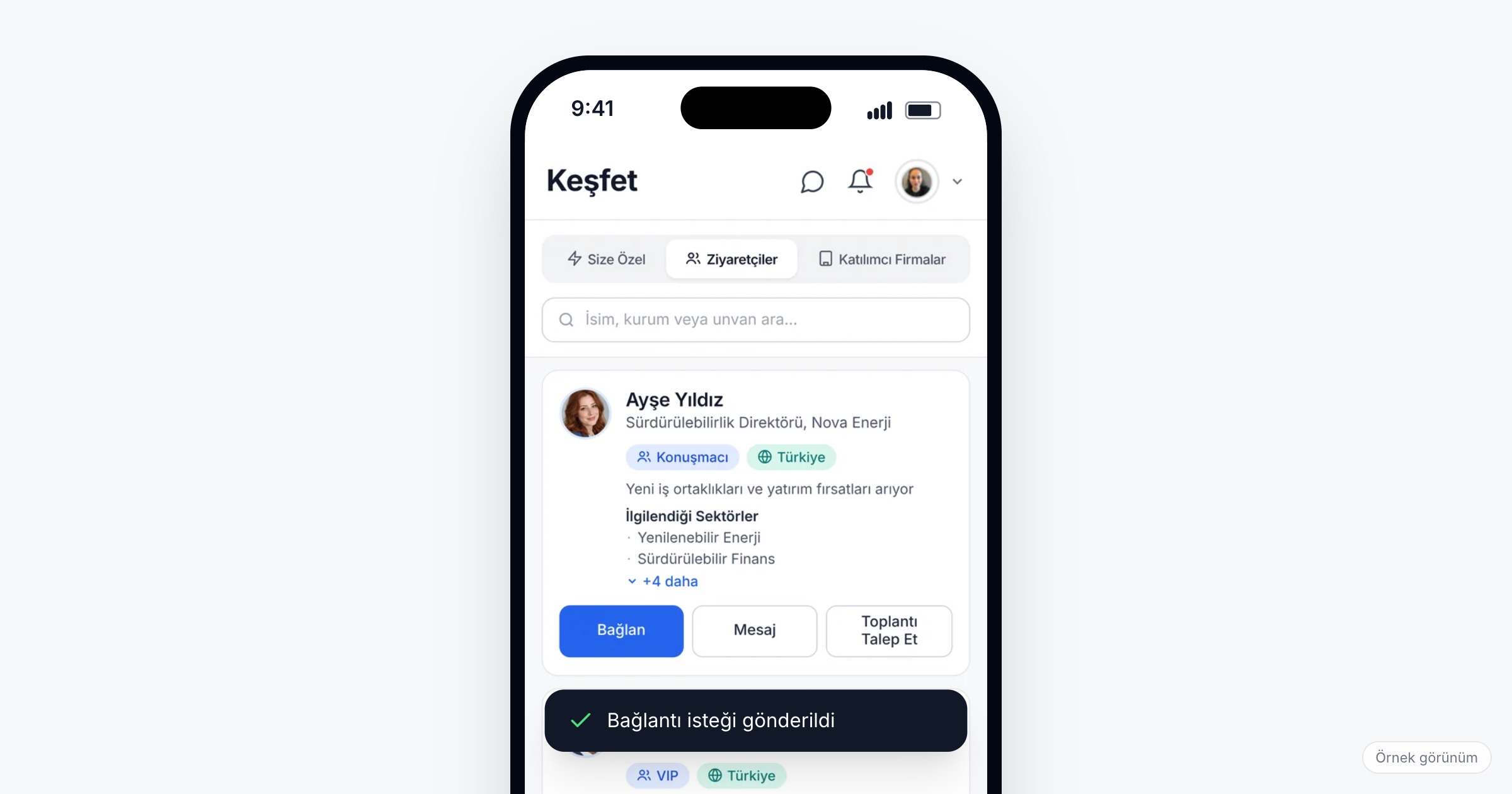
An attendee directory is the list in an event app that shows who is at the event and lets each attendee find the people they came to meet, by name, organization, role, industry or interest, and contact them from the same screen. It matters because most attendees arrive with a few people in mind and no way to find them in a crowd of hundreds or thousands; a directory turns "is anyone from logistics here?" into a search. When you choose an event attendee list app, check search and filters that match your event, category lists for speakers, sponsors and VIPs, profiles that show interests, one-tap connect, message and meeting request, control over which contact fields are shown, and how complete the profiles will be on the first day.
Why finding people at an event is harder than it looks
At a medical congress with 1,200 delegates, a cardiologist wants to meet colleagues in her subspecialty from neighbouring countries before the session they will all attend. The printed delegate list is alphabetical, and it says nothing about subspecialty.
At a trade fair, a buyer looking for packaging suppliers in the Marmara region can find the exhibiting companies on the floor plan, but not the person at each company who handles export orders.
Corporate events have their own version. At a kick-off with 600 employees from five regions, a new hire wants to find the person in finance who approves travel claims; she knows the name from an email signature and nothing else. At a dealer meeting, a dealer from Bursa wants his regional manager, the product manager for his line and, ideally, two dealers from other regions who sell the same products, without handing his own phone number to his direct competitor in the next province.
In all of these cases the list exists. What is missing is a way to search it the way people think about each other, and profiles with enough in them to search.
What to look for in an attendee directory
1. Search by name, organization and title
People remember each other in fragments: "the woman from the cold chain company who spoke on the panel", "the head of procurement at our biggest partner". Search across name, organization and title covers most of these.
2. Filters that use your event's own vocabulary
Industry, role, interests, location and company are the filters attendees reach for. They only work if the values come from fixed lists at registration rather than free text; "logistics", "Logistics & Supply Chain" and "lojistik" are three different filters if people type them. Build the registration form and the directory filters together.
Ask the vendor: Which fields can attendees filter the directory by? Do the filters use the values we collect at registration?
3. Category lists for the people everyone looks for
Some groups deserve their own list: speakers, sponsors, VIPs, attendees from a given sector. At a congress, delegates look for speakers after their session; at a fair, sponsors want to be found; at a dealer meeting, the headquarters team is the list every dealer opens first.
4. Profiles that say why someone is here
A name and a company tell you who someone is, not why you should talk to them. Interests on the profile ("expanding into Central Asia", "looking for regional distributors", "joining the new CRM project") give a reason to start a conversation, and they are what filters and suggestions work from.
5. One tap from the profile to a conversation
A directory that ends in a profile page leaves the attendee to find another way to get in touch. From the profile, an attendee should be able to send a connection request, write a message or request a meeting in one tap. We cover the meeting side in B2B meeting scheduling at events.
Ask the vendor: What can an attendee do from a profile? Does a meeting request from the directory include a time and a place?
6. Contact fields you choose per event
Not every event should show the same details. At a congress, delegates may expect each other's LinkedIn and website; at a dealer meeting, showing dealers' phone numbers to each other may be exactly what you want to avoid; at a kick-off, a work email may be enough. The organizer should decide, per event, which contact fields a profile card shows, and attendees should be able to talk in the app without exchanging any of them.
Ask the vendor: Can we choose which contact fields appear on a card (email, phone, LinkedIn, website) for each event?
7. Profile completeness is what makes the directory useful
A directory is only as good as the profiles in it. The simplest step is to ask for the fields the directory needs at registration (role, industry, location, interests) and carry them into the app, so a profile arrives filled on the first day instead of waiting for the attendee to complete it. Remind those whose profiles are still thin a few days before the event; an empty profile is invisible to every filter.
8. Suggestions next to the list, with feedback
An event networking directory suits people who know what they are looking for. For the rest, suggestions built from profiles and goals, each with its reason, do the browsing for them. Letting attendees rate the suggestions they get shows you whether the suggestions are working.
What a directory shows, and to whom
A directory puts attendees' names, organizations, titles and interests in front of everyone else at the event. For this data the organizer is usually the data controller and the app vendor the data processor. Under Turkey's KVKK and the GDPR, the privacy notice should tell attendees what their profile will show and to whom, including which contact fields are visible at this event. Collect only the profile fields you actually use, and switch on only the contact fields the event needs. This article is not legal advice; talk to your legal counsel about your own case.
Checklist before the event
- Define attendee categories (speaker, sponsor, VIP, exhibitor, dealer, employee) and collect them at registration.
- Turn industry, role, location and interests into fixed lists on the registration form.
- Decide which contact fields profile cards show at this event.
- Check that profiles arrive in the app filled with what attendees gave at registration.
- Remind attendees with incomplete profiles a few days before the event.
- Open the directory with the invitation, so people can look before they arrive.
- Explain in the privacy notice what profiles show and to whom.
Common mistakes
- Asking only for a name and an email. The directory becomes an alphabetical list nobody searches.
- Free-text fields for industry and role. The same sector appears under five spellings and filters miss most of them.
- Showing every contact field by default. Phone numbers end up with people the attendee never meant to share them with.
- Opening the directory on the first morning. The time for looking people up is the week before, when there is room in the calendar.
- Leaving speakers and sponsors in the general list. The people most attendees are looking for are the hardest to find.
How Eventiqs helps
On Eventiqs, the Visitor Directory lists attendees, searchable by name, organization or title, with filters for industry, role, interests, location and company and category lists for speakers, sponsors, VIPs and sectors (visitor directory). Each profile shows the attendee's interests, and connecting, messaging or requesting a meeting takes one tap (messaging and meeting requests). The organizer decides per event which contact fields (email, phone, LinkedIn, website) a card shows, so the directory shows only what the organizer turned on, and attendees message each other without sharing contact details. Profile and interest data are collected at registration, and each attendee's profile arrives in the app filled with what they gave (event registration). In the For You tab of Explore, Smart Matching uses AI to suggest people and companies, each with its reason and match score, and attendees can rate the suggestions they get (smart matching). For the wider networking picture, read networking at corporate events.